
Key Takeaways
- Automated SEO reporting earns CFO attention only when it terminates inside the CRM against opportunity records with deal values, not inside an analytics property.
- Three data joins carry the architecture: GSC to GA4 at the query level, GA4 to CRM at the contact level, and CRM to opportunity at the deal-value level.
- Standardize one multi-touch attribution model across the book—time-decay for long B2B cycles, position-based for shorter service cycles—and treat client variation as a justified exception.
- Once the joins hold, the monthly report stops being the product; CRM revenue signal feeds back into content prioritization, raising accounts-per-FTE and tightening the targeting loop.
Why SEO Reports Lose the Room at QBR
The pattern repeats across agency QBRs every quarter. The Head of SEO opens with impressions up 34%, non-brand clicks up 22%, three featured snippets captured, and a domain authority tick. The client CMO nods. Then the CFO, who joined late, asks the question that ends the slide: what did this produce in pipeline?
Silence, or worse, a session-to-conversion ratio pulled from GA4 that nobody in the room trusts.
The issue is not effort. Most agency reporting stacks already automate the hard parts: rank tracking, crawl diagnostics, GSC pulls, content velocity dashboards. The issue is where the report terminates. When automated SEO reporting ends inside an analytics property, it answers questions the client's revenue team did not ask. When it terminates inside the client's CRM, against opportunity records with deal values attached, it answers the only question that protects the retainer.
That terminus point is an architectural choice, not a slide design choice. It depends on three data joins that most agencies handle partially or not at all: search query data into GA4, GA4 sessions into CRM contact records, and CRM contacts into opportunity records with revenue attached 5, 6. Industry guidance on B2B attribution now frames this explicitly as the difference between lead-level reporting and revenue-level reporting 6, and treats marketing ROI as a function of pipeline value rather than top-of-funnel volume 7.
The sections that follow lay out the architecture, the model selection, and the delivery tradeoffs an agency leader actually has to make.
The Three Joins That Turn Reporting Into Revenue Evidence
Join One: Google Search Console to GA4 at the Query and Page Level
The first join is the one most agencies think they have already finished. They linked GSC to GA4 during onboarding, confirmed the Search Console collection appeared in reports, and moved on. The architecture problem starts the moment a client portfolio includes more than one domain or property.
Google's linkage rules are restrictive in a way that bites at scale. A GSC property can only be linked to a single GA4 property and web stream, and the Search Console reports do not surface inside GA4 until the collection is explicitly published from the Library 1. That second step is the silent failure: the connection registers as complete, the data flows, but the landing-page-and-query report stays hidden until someone opens GA4's Library and publishes it.
For an agency running 15 to 60 accounts, this translates into a portfolio-level constraint. A client with three subdomains and a separate marketing site cannot be served by a single GSC-GA4 link. Each property pairing has to be mapped, owned by an account with the right permissions, and verified on a recurring basis when clients rotate marketing ops staff.
The payoff for getting this join right is what the rest of the architecture depends on. Once query and landing page data sit inside GA4 alongside session, source, and event data, the SEO layer stops being a separate report. It becomes a column in the same table as everything else the analytics property captures, which is the only state in which the next join, into the CRM, has anything useful to carry.
Join Two: GA4 to CRM at the Contact and Lifecycle Level
The second join is where most agencies stall, because the work shifts from configuration to taxonomy. GA4 captures sessions, events, and source data. The CRM captures contacts, lifecycle stages, and deal records. Connecting them at the contact level means deciding which SEO touchpoints correspond to which lifecycle stages, then enforcing that mapping across every client instance.
The operational version of this is straightforward. Awareness-stage content (educational blog posts, definitional pages, top-of-funnel guides) maps to the awareness lifecycle stage. Mid-funnel content (comparison pages, vendor-evaluation guides, methodology breakdowns) maps to consideration. Bottom-of-funnel assets (pricing pages, ROI calculators, demo request flows) map to decision-stage interactions 8. When a contact's first or assisted touch matches one of these pages, the lifecycle stage in the CRM should reflect that, and the source field should carry the organic-search attribution forward.
What makes this hard is that the mapping cannot be borrowed wholesale across clients. A SaaS client's comparison page behaves like a consideration asset; a legal-services client's comparison page often behaves like a decision asset because the buying cycle compresses. The taxonomy stays the same, but the asset-to-stage assignment is per-client.
Beyond the technical join, the prerequisite is organizational. Industry guidance is direct on this point: integrating SEO and CRM data effectively requires both data integration and team alignment on a single funnel definition 9. If the client's sales team disputes what counts as an MQL, no GA4-to-CRM pipe will resolve the argument. The agency that wins this join is the one that arrives at the onboarding session with the touchpoint-to-stage map already drafted and gets sales signoff before the first sync runs.
Join Three: CRM to Opportunity at the Deal-Value Level
The third join is where SEO reporting earns the right to sit in a CFO meeting. Without it, the report stops at lead count. With it, the report carries deal value, stage progression, and closed-won revenue back to the organic-search touchpoints that initiated the journey.
The technical reality depends on which CRM stack the client runs. For accounts using HubSpot as the marketing system and Salesforce as the system of record, the deal sync setting must be enabled before opportunities are imported; if it is not, deal records will not be created in HubSpot at all, and the SEO-to-revenue path silently terminates at the contact level 11. This is a one-click toggle that, when missed, invalidates every pipeline number the agency reports for the rest of the engagement.
The second failure point is association preservation. A contact-to-opportunity association in Salesforce should create the equivalent contact-to-deal association in HubSpot, but only if sync is turned on for all three record types: contacts, deals, and companies 12. When any of the three is disabled, the opportunity record exists but cannot be tied back to the contact that originally arrived through organic search. Reports run, numbers populate, and nothing in the pipeline column actually reflects SEO's contribution.
An audit step belongs in the agency's standard onboarding checklist: confirm the deal sync toggle, confirm all three record-type syncs are active, and spot-check a sample of contact-opportunity pairs to verify the association survived the round trip. That verification is the difference between a report a CFO can read and a report a CFO can dismiss.
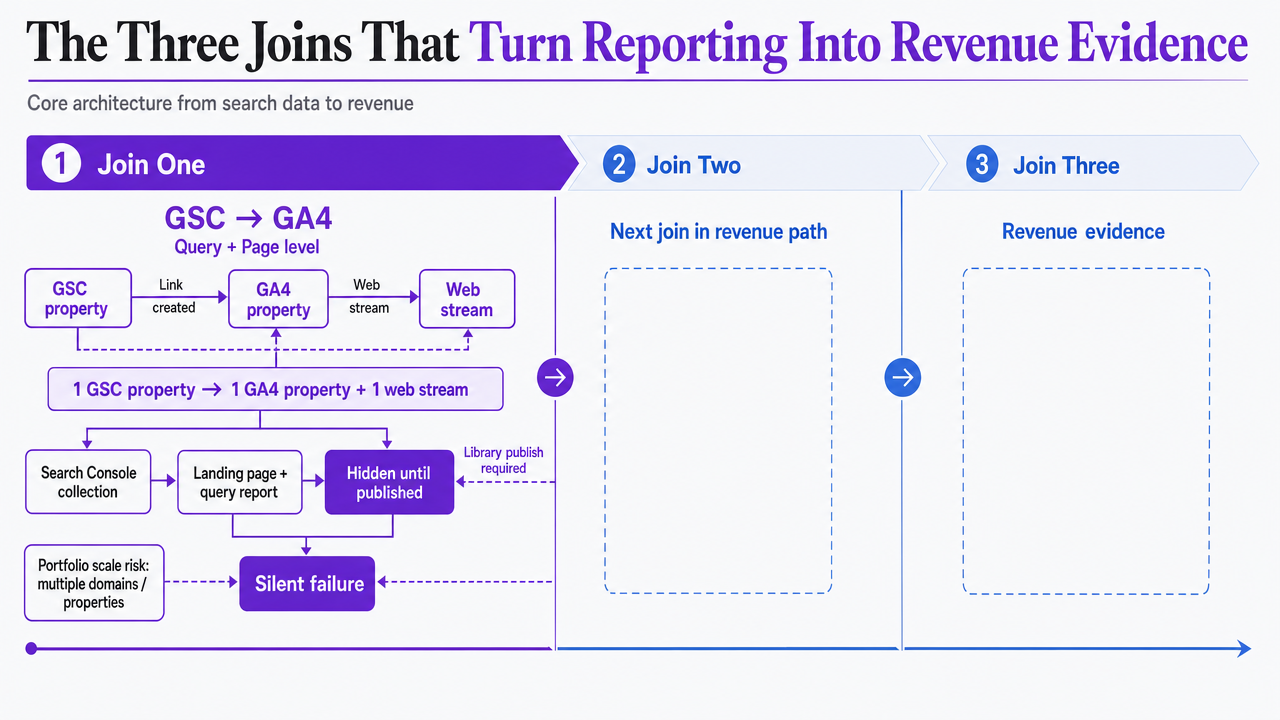 Visualize the three sequential data joins that form the core architecture described in this section, mapping the flow from search data to revenue
Picking the Attribution Model You Can Actually Defend
Lead-Level vs. Revenue-Level: The Reframe That Changes the Contract
The single reframe that changes how a Head of SEO sells reporting to a client CFO is the distinction between lead-level and revenue-level attribution. Lead-level attribution stops at the conversion event: a form fill, a demo request, a content download. Revenue-level attribution continues the trail through pipeline stages and deal values, so the SEO report carries closed-won dollars next to the queries that started the journey 6.
The mechanical difference is one integration: the attribution layer has to be connected to the CRM, and the CRM has to be carrying opportunity records with values attached 6. Without that link, every pipeline number in a monthly report is an estimate. With it, the number is an audit trail.
The commercial difference is larger. A lead-level report invites the question how many of these leads actually closed? and the agency has no answer in the room. A revenue-level report answers that question on the first slide, then moves to what to do next. The contract conversation shifts from defending the retainer to discussing where to expand it.
For an agency book of 15 to 60 accounts, the practical implication is that lead-level reporting becomes the floor for accounts in their first 90 days, and revenue-level reporting becomes the standard for any account past quarter one. Anything less keeps the CFO out of the room, which is where renewal decisions actually get made.
Single-Touch, Multi-Touch, and What QBRs Reward
Once revenue-level attribution is on the table, the next decision is how to distribute credit across the touchpoints that produced the deal. Single-touch models assign 100% of the credit to one interaction, typically first-touch or last-touch. Multi-touch models distribute credit across every touchpoint in the conversion path 2.
For SEO, the model choice is not neutral. A last-touch model systematically undercredits organic search because top-of-funnel discovery rarely sits at the end of the path. A first-touch model overcredits the awareness blog post that started the journey and ignores the comparison page and pricing calculator that actually moved the deal. Industry guidance has been direct on this for years: appropriately attributing marketing activity today requires a multi-touch model, of which several variants exist 4.
The multi-touch options that QBRs reward are linear, time-decay, and position-based. Linear splits credit evenly across every touchpoint, which is defensible but flat. Time-decay weights touchpoints closer to the conversion more heavily, which favors mid- and bottom-funnel SEO assets. Position-based (often configured as 40-20-40) gives first and last touches the largest share with the middle distributed across assists, which tends to produce the most stable SEO credit across long B2B cycles 3.
The standard most agencies can actually defend in a QBR is time-decay or position-based, because both acknowledge SEO's role as a journey-starter without inflating it past what the CFO will accept. Linear works for shorter cycles. Single-touch models invite the argument the agency does not want to have.
Standardizing One Model Across the Client Book
The temptation, especially in agencies that pride themselves on tailoring, is to let each client pick the attribution model that suits their internal politics. That decision compounds badly at portfolio scale. Twenty accounts on five different models means five different report templates, five different QBR narratives, and five different definitions of what SEO contribution means.
The operational call is to pick one model as the agency standard and treat client variation as an exception that requires explicit justification. Time-decay is the safest default for B2B SaaS books because it accommodates long cycles without overweighting awareness assets 7. For shorter-cycle service verticals, position-based holds up better.
Standardization does two things at once. It compresses the analyst time required to produce each monthly report, which is the gating factor for accounts-per-FTE. And it lets the agency build a single internal benchmark library: average organic-sourced pipeline per account, average deal value by content stage, median time from first organic touch to closed-won. None of those benchmarks exist if every client runs a different model.
Variation belongs in the touchpoint-to-stage mapping, not in the credit distribution math.
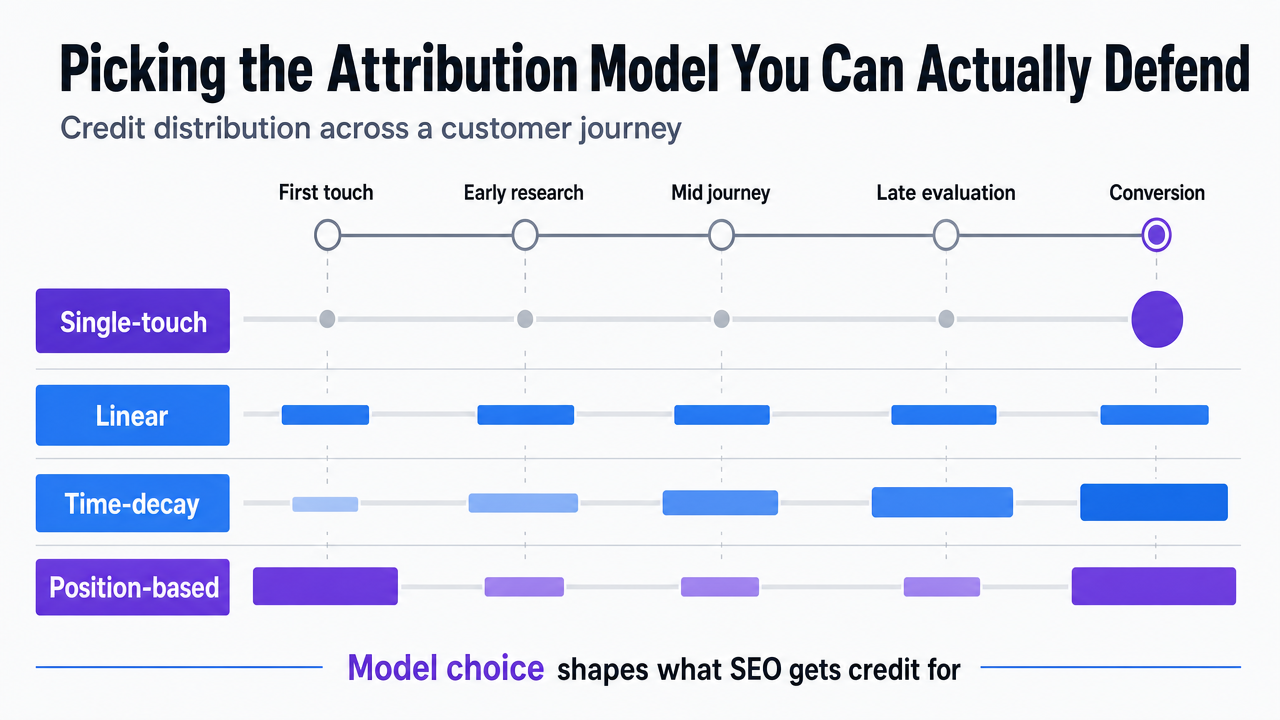 Compare the attribution models discussed in the section (single-touch vs linear, time-decay, position-based) with their credit distribution patterns
Test Pipeline-Connected SEO Reporting in Real Time
See how automated SEO insights link directly to client pipeline impact using your live campaigns.
Failure Modes That Quietly Break Pipeline Reports
The integrations described so far rarely break loudly. They break in ways that produce reports, populate numbers, and look correct until someone audits a specific deal back to its first organic touch and finds the trail missing.
Four failure modes account for most of the silent breakage across an agency's client book.
- Lifecycle stage drift. Each client instance starts with a clean lifecycle definition during onboarding. Six months in, the client's sales ops team has added a custom stage, renamed MQL to "Marketing Engaged," or split SQL into two sub-stages without telling the agency. The agency's GA4-to-CRM mapping still writes to the old field. Reports continue running. Pipeline numbers no longer mean what they meant in Q1. Quarterly stage-name audits, not just data audits, belong in the standard delivery checklist.
- Source field overwrites. The organic-search source attached to a contact at first touch gets overwritten when the same contact later arrives through a paid retargeting click or a sales-sent email. Multi-touch attribution depends on preserving the full source history, not the most recent value. Without first-touch and assisted-touch fields configured as separate properties, SEO loses credit on every contact that returns through another channel before converting.
- Broken contact-opportunity associations. Already covered in the third join, the failure deserves restating in operational terms: if the HubSpot-Salesforce sync runs without all three record types (contacts, deals, companies) enabled, opportunity values appear in reports but cannot be traced back to the SEO-sourced contact 12. Agencies running this stack should treat the three-record-type confirmation as a non-negotiable item in monthly QA, not a one-time setup task.
- Unaligned funnel definitions between agency and client sales. The integration can be flawless and the report still get rejected if the agency's definition of a qualified lead differs from what the client's sales team accepts. Effective use of SEO and CRM data requires both data integration and team alignment on a shared funnel definition 9. The fix is procedural: the touchpoint-to-stage map gets reviewed with the client's sales leader, not just marketing ops, before any monthly report carries pipeline numbers.
None of these failures show up in dashboard error logs. They show up when a CFO asks to trace a specific closed-won deal back to its origin and the agency cannot produce the path.
From Client Deliverable to Content Prioritization Input
Once the three joins hold and the attribution model is standardized, the monthly report stops being the product. The data behind it becomes the product.
That reframe is what separates agencies that scale SEO delivery from agencies that hit a headcount wall around 20 accounts. A monthly PDF is a defense exercise. The same data, queried for which content stages produced the highest closed-won contribution per account, is a prioritization input that tells the content team what to write next, which existing pages to refresh, and which keyword clusters to retire.
The mechanics are straightforward once the joins exist. Pulling deal value by first-touch landing page surfaces the awareness assets that actually start revenue paths, not the ones that just rank. Pulling assisted-touch revenue by mid-funnel page surfaces the comparison and methodology content worth doubling on. Pulling closed-won by query cluster surfaces the search intent worth defending with new pages and internal links. None of that analysis requires new tooling once the GA4-to-CRM and CRM-to-opportunity layers carry deal values back to the touchpoint level 8.
The margin implication is direct. Content production capacity is finite per account. Pointing that capacity at the touchpoints with demonstrated pipeline contribution, rather than at the topics that look strong in a keyword tool, is the lever that lets a delivery team produce fewer pieces and report better numbers. Automated SEO reporting becomes the brief.
See How Automated SEO Reporting Ties Directly to Pipeline Impact
Request a walkthrough of integrated reporting workflows that quantify SEO’s contribution to client pipelines, with live dashboards and actionable data tailored for agency operations.
If You Manage Reporting Across 15-60 Accounts: Delivery Model Tradeoffs
A scope marker before this section develops: the tradeoffs below assume an agency book between 15 and 60 client accounts, each with its own GSC properties, GA4 instance, and CRM configuration. The math for a single in-house team running one stack is different.
Three delivery models cover most of what agencies actually choose between. An in-house analytics pod staffs the joins with full-time analysts and RevOps generalists. An outsourced BI or RevOps consultant builds the architecture per account and hands it back. An AI execution platform with native CRM joins handles the integration layer continuously and routes recommendations through an approval workflow. Each model produces a working pipeline report. They produce it at different speeds, at different per-account ceilings, and with different exposure to client-instance variability.
The variables that matter at portfolio scale are time-to-first-pipeline-report, accounts-per-FTE ceiling, tolerance for client-instance variability (custom lifecycle stages, non-standard CRMs, mixed HubSpot-Salesforce stacks), and reporting refresh cadence.
| Delivery model | Time to first pipeline report | Accounts per FTE ceiling | Client-instance variability handled | Refresh cadence |
|---|---|---|---|---|
| In-house analytics pod | Weeks per account (custom build) | Low (analyst-bound) | High (bespoke per client) | Monthly, sometimes weekly |
| Outsourced BI / RevOps consultant | Weeks to months (project-scoped) | N/A (project labor) | High at setup, brittle after | Quarterly or on-request |
| AI execution platform with native joins (e.g., Vectoron) | Days (templated integration) | High (platform-bound) | Moderate (configurable patterns) | Continuous |
The in-house pod gives the most control and the lowest ceiling. A senior analyst can carry the three joins for a handful of accounts, but the marginal cost of each additional client is another fraction of an FTE. Agencies that scale this model past 25 accounts usually do so by hiring more analysts, which is the headcount wall the architecture was meant to push past.
The consultant model produces a clean build and then erodes. Lifecycle stages drift, source fields get overwritten, and the agency owns the report without owning the system that produces it. Re-engagement fees follow.
The platform model trades some per-account customization for refresh continuity and integration coverage. Native joins between GA4, HubSpot, and Salesforce mean the deal-sync toggles, three-record-type associations, and contact-opportunity links described earlier get monitored rather than rebuilt 11, 12. The accounts-per-FTE ceiling rises because the analyst's job shifts from building reports to reviewing recommendations.
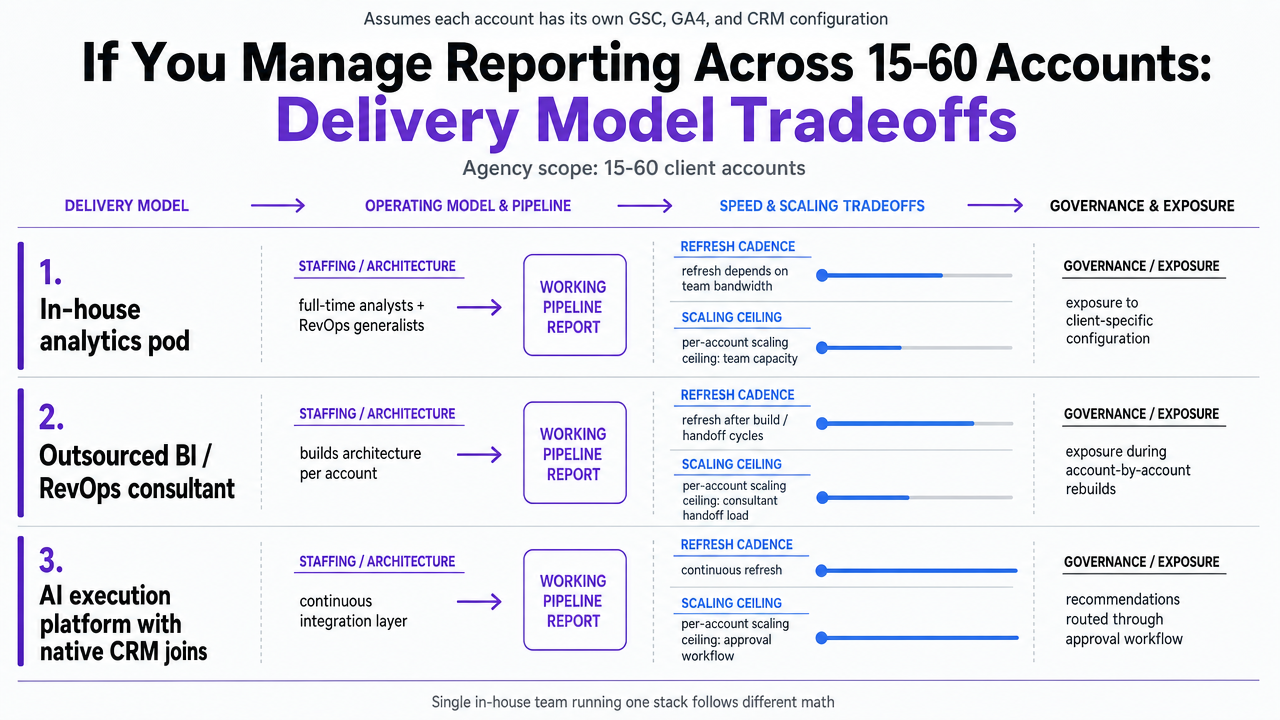 Visualize the three delivery model tradeoffs from the article's comparison table, making the scaling ceilings and refresh cadences scannable
Closing the Loop: CRM Data Feeding Back Into SEO Targeting
The architecture described so far moves data in one direction: search to analytics to CRM to revenue. The agencies extracting the most margin from this stack run the pipe in both directions.
CRM data carries signal that no keyword tool produces. Closed-won deals reveal which job titles, company sizes, and industries actually convert from organic search, not just which segments fill out forms. Lost-deal reasons surface objections that belong in comparison-page copy. Sales call notes name the competitors prospects evaluated, which is the keyword list worth defending. Integrating these CRM insights back into SEO targeting is what turns the reporting stack into a research stack 10.
The practical move is to query the CRM for the attributes of closed-won contacts that arrived through organic search, then re-rank the content calendar against that profile. Awareness topics that produce contacts matching the ideal customer profile get more production capacity. Topics that produce volume but no qualified opportunities get retired. The feedback loop tightens with each quarter of revenue data.
This is the loop AI execution platforms like Vectoron close natively: live CRM signal feeds the SEO strategist, recommendations route through approval, and the next content cycle reflects what the pipeline actually rewarded.
Frequently Asked Questions
References
- 1.Link Google Search Console with Google Analytics 4.
- 2.What Is multi-touch attribution? Models & cross-channel insights.
- 3.Multi-touch attribution: what it is & how to do it right.
- 4.Multi-Touch Attribution: Moving Beyond Overly Simplistic First.
- 5.Revenue Attribution in SaaS: Methods, Metrics, and Implementation.
- 6.B2B SaaS Lead Attribution: Track What Drives Pipeline.
- 7.Marketing Attribution Guide for B2B SaaS (2026).
- 8.SEO CRM Integration Guide | Build a Smarter Lead Pipeline.
- 9.Combine SEO and CRM to Build a Smart Lead Pipeline.
- 10.How CRM Can Boost SEO for an Organization - A Complete Guide.
- 11.Sync Salesforce opportunities to HubSpot.
- 12.Marketing HubSpot <> Salesforce Integration - ROI - Tips, Tricks & Best Practices.