
Key Takeaways
- Screaming Frog SEO Spider runs as a notarized, Apple Silicon-native crawler, delivering fast technical diagnostics like broken links, redirect chains, and canonical conflicts beyond what Search Console surfaces.
- Google Search Console is the authoritative index-stage tool, using URL Inspection and sitemap submission to confirm how Google actually sees and indexes a page 6.
- Ahrefs runs entirely in Safari or Chrome, sidestepping macOS architecture concerns and consolidating keyword research, backlinks, and rank tracking for the serving stage of the production loop.
- Semrush is browser-based and covers crawl audits, position tracking, on-page recommendations, and page experience factors such as Core Web Vitals and mobile usability 4.
- Sitebulb is an Electron-based, notarized crawler that prioritizes audit reports with impact ranking and written explanations, making technical findings actionable for non-developer editors.
- Clearscope scores drafts in the browser or Google Docs against SERP topical coverage, aligning content work with Google's helpful-content direction rather than keyword density 11.
- Vectoron unifies crawl, content, and rank signals into one approval-gated queue, letting Mac content managers scale execution across properties without adding seat licenses or headcount.
What macOS actually changes about SEO tool selection
Mac-based content teams face a narrower vendor list than Windows teams, primarily due to how tools handle Apple Silicon architecture, Gatekeeper notarization rules, and vendor-supported macOS versions 8. An SEO tool that performs well on Windows may be inefficient on an M-series Mac if it relies on Intel-only binaries and Rosetta translation.
The fundamental SEO work remains consistent. Google evaluates sites against the same Search Essentials framework, focusing on crawl accessibility, useful content, structured organization, and technical eligibility 2. The challenge for macOS-compatible software is to validate these signals without introducing friction during installation, rendering, or data export.
Therefore, the key question for a Mac SEO tool shortlist is not merely "which tools have a Mac version," but rather which tools integrate seamlessly into a Mac-native production workflow while effectively addressing Google's published optimization requirements 1. The following seven tools are evaluated on this basis.
The Mac compatibility filter most shortlists skip
Three macOS-specific criteria are crucial for determining a tool's usability, yet they are often overlooked in SEO shortlists. First, macOS Gatekeeper requires Developer ID signatures and notarization for apps downloaded outside the App Store 8. An unnotarized SEO crawler will trigger a security warning that should not be bypassed without careful review.
Second, the architecture split between Intel and Apple Silicon is significant. While Rosetta allows Intel binaries to run on M-series Macs, future macOS releases are expected to increasingly phase out Intel support 12. This reduces the long-term viability of any tool lacking a native ARM build.
Third, each vendor sets a minimum macOS version floor. Apple recommends running the latest macOS for security, stability, and compatibility 7. Tools requiring older macOS versions may pose compatibility issues for teams using up-to-date hardware.
These three checks can quickly narrow down a vendor list. A content team with M2 or M3 hardware on a current macOS release can immediately disqualify tools that only offer Intel binaries, lack notarization, or demand an outdated macOS version. This ensures foundational compatibility before feature comparisons begin.
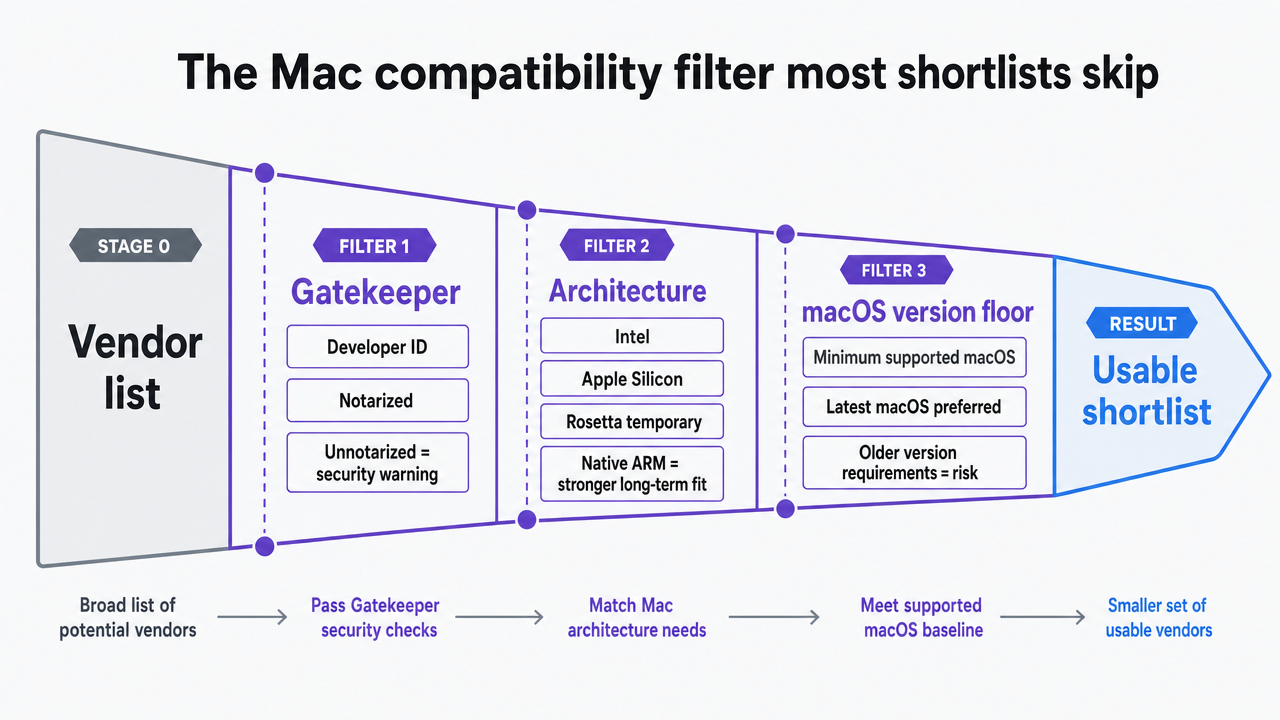 Visualize the three macOS-specific compatibility checks described in this section as a sequential filter that narrows a vendor list
Mapping the shortlist to Google's Search Essentials
Google outlines search as a three-stage process: crawling, indexing, and serving results 3. This sequence provides a clear framework for organizing a Mac SEO toolset, as each stage requires distinct software and operational focus.
The crawl stage utilizes desktop crawlers to simulate Googlebot's behavior, identifying broken links, redirect chains, and blocked resources. These tools export diagnostics essential for editorial teams before requesting recrawls in Search Console 6. The index stage involves URL Inspection and sitemap workflows to confirm page eligibility. The serving stage employs rank trackers and SERP research tools to monitor indexed page performance against query intent.
Two overarching considerations are page experience and mobile-first indexing. Page experience combines Core Web Vitals, HTTPS, mobile usability, and intrusive interstitials into a multi-factor signal 4. Mobile-first indexing means Google primarily crawls the smartphone version of a site for ranking 5. Each tool below is assessed by its coverage of these Search Essentials, rather than simply its feature count.
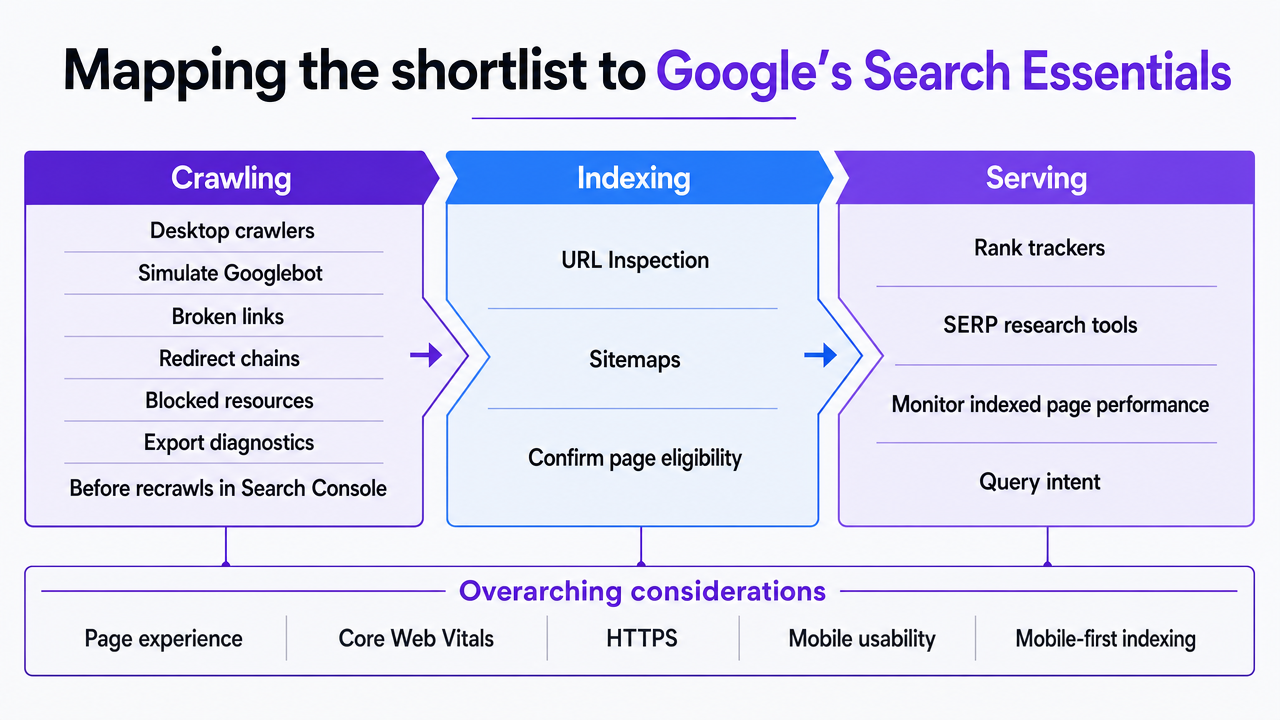 Illustrate Google's three-stage search framework (crawling, indexing, serving) and map tool categories to each stage as described in this section
Test Full SEO Workflows on Live Content Now
Publish real SEO-optimized content and measure results before you commit, risk-free for seven days.
The seven tools, organized by job in the production loop
Screaming Frog SEO Spider — desktop crawler for technical diagnostics
Screaming Frog offers a native macOS application compatible with Apple Silicon and notarized for Gatekeeper 8. This native support is critical for large audits, as a Rosetta-translated build would significantly slow down operations.
Its primary function is to simulate Googlebot's crawl, providing diagnostics for editorial sprints. It identifies issues such as broken links, redirect chains, blocked resources, duplicate titles, and canonical conflicts, offering a level of detail beyond what Search Console provides for a single audit 3.
The Spider also supports custom extraction and JavaScript rendering, enabling Mac teams to verify that the smartphone-rendered version of a page maintains content and link parity with the desktop version, a requirement for Google's mobile-first indexing 5. Licensing is per seat per year, simplifying cost management for scaling teams. Outputs are available in CSV or XLSX, integrating smoothly with existing editorial workflows.
Google Search Console — the URL Inspection and recrawl backbone
Google Search Console is a free, browser-based tool that runs on any macOS device capable of supporting a modern browser. It directly validates the signals Google uses for page eligibility 2, bypassing macOS compatibility concerns like Gatekeeper, Apple Silicon, or version floors.
Its role is index-stage confirmation. URL Inspection reports indexing status, last crawl date, the indexed version, and any structured data or page experience issues. Google recommends URL Inspection for individual URLs and sitemap submission for larger sets 6. This aligns with content team operations: spot-checking revised pages via Inspection and registering broader content batches through sitemaps.
While recrawl requests do not guarantee immediate indexing 6, Search Console remains the authoritative source for Google's actual view of a site. All other tools provide simulations, making Search Console indispensable for understanding Google's perspective.
Ahrefs — browser-native research and rank tracking on Safari or Chrome
Ahrefs operates as a web application, eliminating macOS compatibility issues inherent to desktop software. Its performance is independent of Apple Silicon versus Intel binaries, as it renders within Safari or Chrome, relying only on the browser's macOS requirements 7.
Ahrefs primarily supports the serving stage of the production loop. After pages are crawled and indexed, teams need to track rankings, monitor movement, and analyze competitors. Ahrefs consolidates keyword research, backlink analysis, rank tracking, and competitive content gap analysis into a single interface, reducing context switching for auditors.
The browser-native model also means no local updates are required; new features appear automatically upon page load. Pricing is per workspace per month with seat tiers, offering transparent cost scaling. It complements, rather than replaces, Search Console, as Ahrefs reports observed rankings while Search Console provides Google's logged data 2.
Semrush — multi-surface auditing without a Mac binary requirement
Semrush is a browser-based application, removing any dependency on Mac binaries or Apple Silicon. This ensures compatibility for both M-series and Intel Mac users, avoiding potential future compatibility issues reported for upcoming macOS releases 12.
Semrush offers a comprehensive suite covering multiple production-loop stages. Its Site Audit module addresses crawl diagnostics, Position Tracking monitors rank movement, On Page SEO Checker provides content recommendations, and Backlink Audit manages link risk. It also evaluates page experience factors like Core Web Vitals, HTTPS, mobile usability, and interstitial behavior, aligning with Google's multi-factor framework 4.
The breadth of Semrush is a key differentiator. Teams consolidating from several point solutions benefit from a single seat license and unified data. However, teams already using a dedicated desktop crawler might find the Site Audit module redundant. For Mac teams managing multiple sites, its workspace-level reporting and unified interface streamline portfolio-wide audit status monitoring.
Sitebulb — Electron crawler with auditor-grade reporting
Sitebulb uses an Electron desktop application for macOS, running as a packaged web app within a Chromium shell. While performance on Apple Silicon is generally acceptable for most content-site audits, it can be heavier than native crawlers for very high URL counts. The build is notarized, ensuring Gatekeeper compatibility on current macOS versions 8.
Sitebulb's role overlaps with Screaming Frog in the crawl stage but distinguishes itself through its output. It prioritizes audit reports, ranking issues by likely impact, providing written explanations, and offering actionable guidance for non-technical editors. This is particularly valuable when content marketing managers, rather than developers, are responsible for implementing fixes.
The tool also supports JavaScript rendering and audits mobile versions of pages, facilitating the mobile-first parity checks required by Google's indexing guidance 5. Licensing is project-tiered per month, making it suitable for teams managing a defined portfolio rather than ad-hoc client audits. Sitebulb is ideal when a team requires detailed explanations alongside diagnostic data.
Clearscope — content quality scoring tied to helpful-content signals
Clearscope is a browser-based application with a Google Docs add-on, making macOS installation irrelevant. Its function is content-stage optimization: it scores drafts against terms and concepts found in high-ranking pages for a target query, highlighting areas where content is thin compared to the SERP.
This approach aligns with Google's content guidance, which emphasizes helping search engines understand content and assisting users, rather than keyword stuffing 1. Clearscope's scoring model focuses on topical coverage gaps, guiding editors toward Google's helpful-content direction 11.
Nielsen Norman Group suggests that usability and SEO converge because both users and search engines benefit from clarity 10. Clearscope operates at this intersection, providing draft-level recommendations for human editors, not automated rewrites. Pricing is per seat per month, offering a strong value proposition for teams producing numerous briefs weekly, especially when compared to per-article freelance optimization costs.
Vectoron — AI marketing execution platform with approval-gated automation
Vectoron represents a distinct category: a unified AI marketing execution platform with approval-gated automation. It doesn't replace crawlers or Search Console but integrates their signals to propose editorial actions aligned with team objectives. This category addresses the growing need for coordination across crawl diagnostics, content optimization, rank tracking, and link building within in-house content teams, without requiring additional headcount.
Its core mechanism is the approval gate: AI strategists analyze live data (crawl issues, indexing status, query movement, content gaps) and rank recommended actions. However, nothing is published until a human content manager approves it. This model fits Mac-native workflows, as the operator's interface is browser-based, and work surfaces (drafts, briefs, audit notes) are accessible on any macOS device running a current Safari or Chrome browser.
Vectoron offers two key operational advantages over traditional point tools. It consolidates seat licenses that would otherwise span multiple vendors, and it accelerates the audit-to-publish cycle by routing recommendations through a single approval queue. Vectoron is designed for content teams seeking to scale execution efficiently without increasing headcount.
Stack economics: point tools versus a unified execution layer
A typical Mac SEO stack often includes five separate tools:
- a technical crawler
- a rank tracker
- a content optimizer
- a backlink tool
- an analytics platform
Each addresses a specific aspect of Google's Search Essentials 2 and is billed per seat. The true cost extends beyond subscriptions to include the analyst hours spent transferring and reconciling data between these disparate systems.
The following table compares the overhead of a multi-tool stack versus a unified AI execution layer, using variables for costs and coordination time. Content teams can input their specific vendor quotes and internal time estimates.
| Cost component | Five-tool point stack | Unified AI execution layer |
|---|---|---|
| Annual subscriptions per seat | Sum of 5 vendor prices × seats | 1 platform price × seats |
| Licenses to administer | 5 contracts, 5 renewal cycles | 1 contract, 1 renewal cycle |
| Analyst hours per week on coordination | Hours exporting, reconciling, and routing recommendations across 5 dashboards | Hours reviewing ranked recommendations in one approval queue |
| Audit-to-publish cycle | Crawl export → brief → optimizer pass → publish → recrawl request, across separate tools | Same sequence, surfaced as one queue with approval gates |
| Tasks validated against Search Essentials | Distributed across vendors; gaps depend on coverage 2 | Mapped to crawl, content, and serving stages in one interface 1 |
This comparison highlights that the optimal choice depends on team specifics. A small team managing a single site with limited SEO needs might find a narrow point stack more cost-effective. However, teams producing dozens of pages monthly across multiple properties often incur greater costs from coordination time than from license fees, making a unified layer more advantageous.
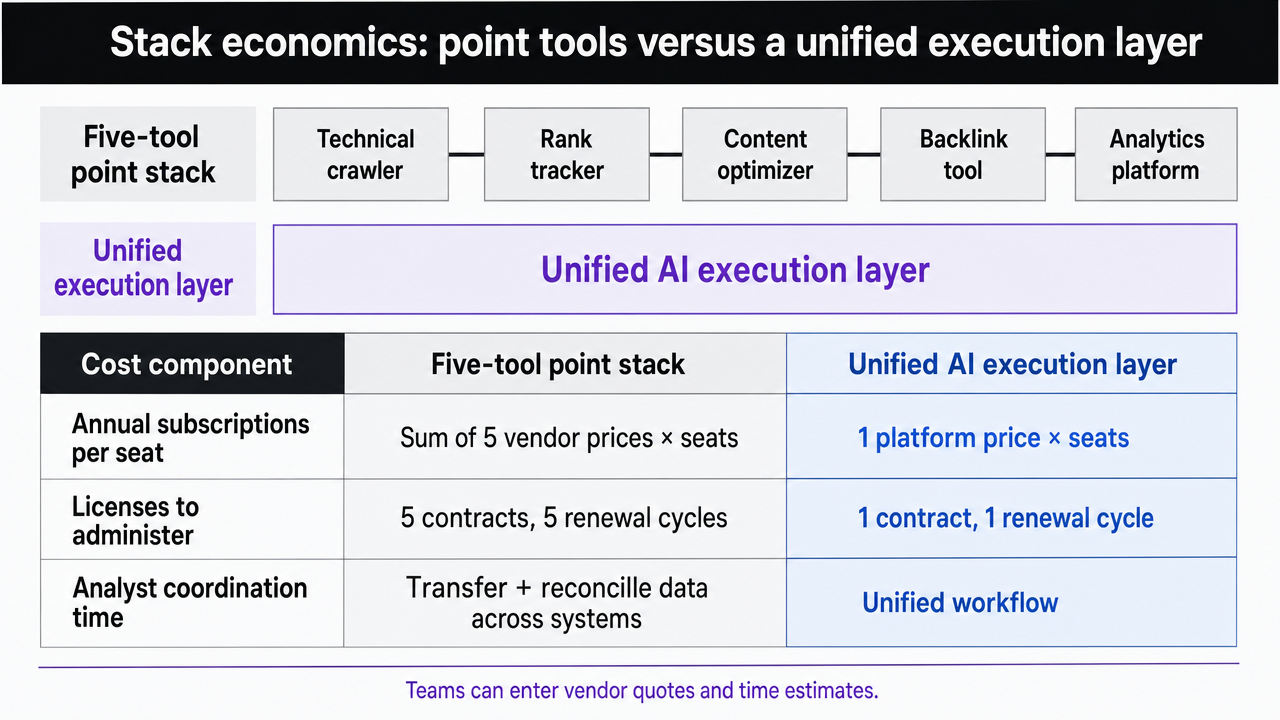 Visualize the comparison table contrasting a five-tool point stack against a unified AI execution layer across cost and coordination dimensions
See How Enterprise Teams Accelerate SEO on OS X Without Adding Headcount
Connect with our specialists to benchmark your current SEO workflow on OS X and discover data-backed strategies to scale content production and search performance efficiently across large portfolios.
If a team manages multiple brands or locations
The economic calculus shifts significantly for content managers overseeing SEO across a portfolio of brands or locations, such as agencies, DSOs, or multi-location businesses. These operators typically replicate the same five-tool stack for each property, leading to a multiplication of seat licenses, audit schedules, and reporting cadences that do not scale linearly with output.
Two operational challenges become prominent:
- First, crawl exports from each property arrive as separate CSVs, requiring manual reconciliation to identify cross-portfolio patterns.
- Second, recrawl requests via URL Inspection are a per-property action without batch processing 6.
A portfolio of fifteen sites translates to fifteen Search Console properties, fifteen audit calendars, and fifteen approval threads.
For portfolio operators, the crucial filter is whether a tool offers workspace-level reporting above individual properties and consolidates recommendations into a single review queue. Unified execution layers often outperform best-of-breed point tools in this scenario, not by offering deeper individual audit capabilities, but by significantly reducing the coordination overhead a single operator must manage.
A decision matrix by team size and content velocity
SEO tool selection becomes clearer when considering team headcount and publishing cadence. The shortlist presented does not yield a single "right" answer but rather three configurations tailored to a team's output volume.
| Team profile | Output range | Stack configuration |
|---|---|---|
| Solo content manager, one property | Up to ~8 pages per month | Search Console for index validation 6, one desktop crawler for periodic audits, one content scorer at the draft stage |
| Small team, one to three properties | ~10–40 pages per month | Search Console plus a browser-native research suite for rank tracking, a desktop or Electron crawler for monthly technical audits 3, a content scorer integrated into the editorial workflow |
| In-house team, portfolio operator | 40+ pages per month across multiple sites | Search Console at each property, plus a unified AI execution layer routing crawl, content, and serving-stage recommendations through one approval queue against the Search Essentials framework 2 |
The primary factor influencing configuration choice is coordination time, not budget. When a single operator spends more hours reconciling data across multiple tools or properties than acting on it, the benefits of consolidation become evident. This threshold marks where a unified platform begins to deliver significant returns.
Frequently Asked Questions
References
- 1.Search Engine Optimization (SEO) Starter Guide.
- 2.Google Search Essentials.
- 3.In-Depth Guide to How Google Search Works | Documentation.
- 4.Understanding page experience in Google Search results.
- 5.Mobile-first Indexing Best Practices | Google Search Central.
- 6.Ask Google to recrawl your URLs.
- 7.Update macOS on Mac.
- 8.Safely open apps on your Mac.
- 9.Apple security releases.
- 10.SEO and Usability - NN/g.
- 11.Google's SEO Starter Guide Set For A Major Update.
- 12.Can your Mac run macOS 27 Golden Gate? - Macworld.