
Key Takeaways
- Search performance monitoring through Google Search Console, Bing Webmaster Tools, and GA4 anchors the stack, though GSC's 16-month data window forces external warehousing for longer historical analysis 9.
- Technical audits scale with Screaming Frog's free 500-URL crawls, PageSpeed Insights for Core Web Vitals field data, and Ahrefs Webmaster Tools for owned-property link health 5.
- Keyword and content discovery runs on Google Autocomplete, Keyword Planner, and Trends, covering ideation, banded volume, and seasonality without paid keyword databases 7.
- Microsoft Clarity fills the UX and behavioral gap with session recordings and heatmaps, letting strategists separate layout problems from copy problems before allocating retainer hours.
- Looker Studio consolidates reporting by templating one canonical client dashboard that clones across accounts, turning monthly reporting from labor into a configuration task 6.
- Browser-layer utilities like MozBar and SEOquake handle 30-second competitive spot checks during calls without licensing coordination across team members 6.
- Zapier's free tier and self-hosted n8n act as connective tissue between tools, but Zapier's 100-task monthly cap breaks down around ten actively alerting clients 4.
- Free stacks hit ceilings at Screaming Frog's 500-URL cap, Zapier's task limits, and GSC's data window, after which coordination across a client roster becomes the real constraint 2.
The Agency Math on Free SEO Tools
Every Head of SEO managing multiple client accounts understands that paid SEO platforms scale linearly with the client roster, billing per seat, per workspace, or per tracked domain. Free tools, however, do not. This fundamental difference makes a serious procurement conversation about free stacks essential, rather than a quick dismissal.
The critical question isn't whether free tools exist, but which ones can be standardized across multiple clients without incurring hidden costs. A tool that demands extensive per-client setup, exports data in incompatible formats, or limits historical data to a period shorter than a typical client contract isn't truly free at an agency scale. Instead, it merely shifts costs from software subscriptions to labor.
This article categorizes the free SEO tool landscape into six essential workflow slots required for an agency-grade delivery pipeline 5. For each slot, we identify a recommended tool, its operational limitations, and the point at which a free solution becomes impractical.
Six Workflow Slots That Define an Agency-Grade Free Stack
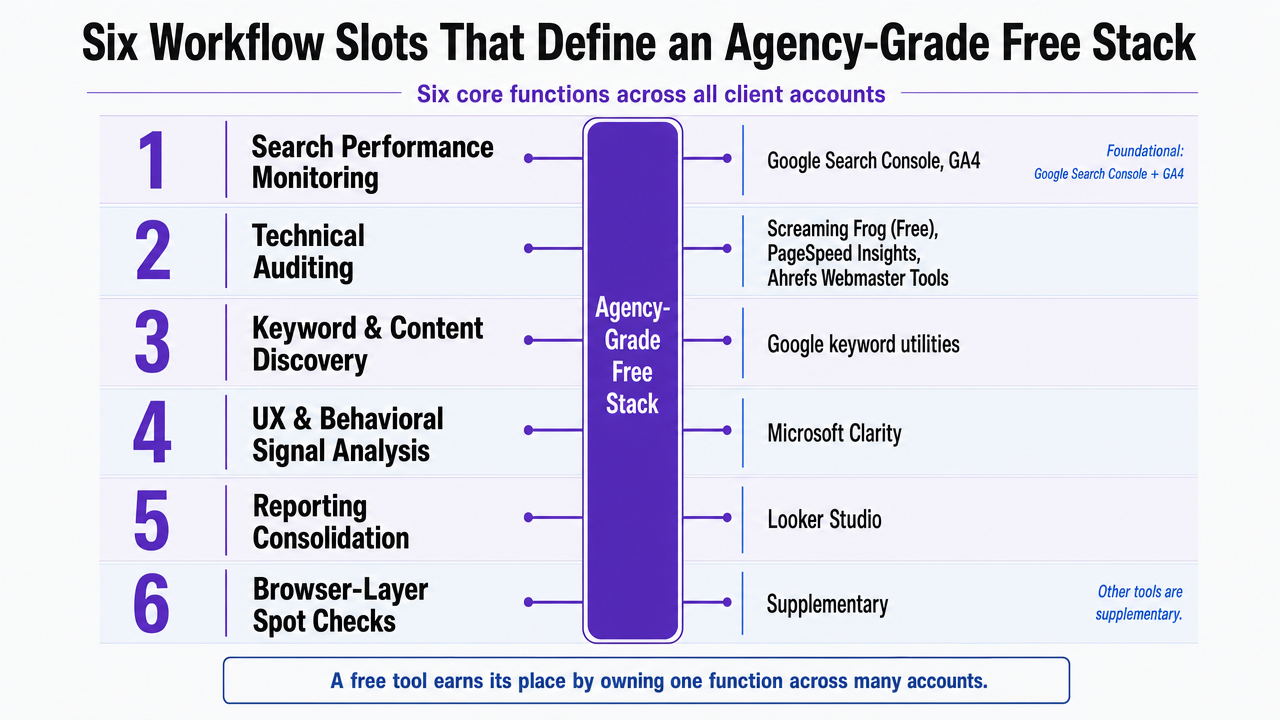
Six core functions are consistently required across all client accounts, regardless of industry or contract size:
- search performance monitoring
- technical auditing
- keyword and content discovery
- UX and behavioral signal analysis
- reporting consolidation
- browser-layer spot checks
A free tool earns its place by effectively managing one of these functions across numerous accounts, not by offering a multitude of features.
The tools that meet this criterion are few. Google Search Console and GA4 are foundational for monitoring 9. Screaming Frog's free version, PageSpeed Insights, and Ahrefs Webmaster Tools provide essential audit capabilities 5. Google's own keyword utilities facilitate discovery 7. Microsoft Clarity addresses UX insights. Looker Studio integrates the various outputs 6. Other tools are supplementary.
Slot 1: Search Performance Monitoring (GSC, Bing Webmaster, GA4)
Google Search Console (GSC) and GA4 are indispensable free platforms for any agency's SEO stack 9. The key consideration for agencies is how these tools perform when managing dozens of properties simultaneously.
GSC offers clean scalability for identity management. Domain verification via DNS takes minimal time per client, and an agency workspace can accommodate hundreds of properties under a single login with granular user permissions. Query, page, country, and device data are accessible through its API, eliminating the need for manual CSV exports for client reports. A primary operational constraint is the 16-month data window 9. While this limit is often unnoticeable for clients on annual cycles, it necessitates external data warehousing (e.g., BigQuery via free bulk export or a Looker Studio-connected store) from the outset for clients requiring longer-term analysis, such as year-over-year replatform reviews.
Bing Webmaster Tools serves a similar monitoring role. Bing's crawler influences a significant portion of answer-engine results, and its guidelines align with the technical baselines agencies audit for Google: crawlability, indexability, structured content, and site architecture 10. Setup is comparable to GSC, providing a valuable second index of coverage data and a redundancy check against potential Google-centric blind spots.
GA4 provides the traffic and behavioral data for the monitoring layer 3. Its event-based modeling requires early standardization decisions 9. Agencies that establish a single event schema, conversion definition set, and Looker Studio template, then clone this configuration for new clients, can reduce GA4 onboarding from days to hours. Conversely, allowing each account to develop custom event names leads to increased effort during quarterly reviews.
These three tools are permanent fixtures because they generate the primary data consumed by other free tools in the stack. Their outputs are essential for the functionality of downstream components.
Slot 2: Technical Audit at Scale (Screaming Frog Free, PageSpeed Insights, Ahrefs Webmaster Tools)
Technical audits are a critical area where free stacks either prove their worth or fail under the demands of client volume. The effective trio includes Screaming Frog's free version, PageSpeed Insights, and Ahrefs Webmaster Tools, each addressing a distinct aspect of the audit process 5.
Screaming Frog's free tier allows crawls of up to 500 URLs 2. This limit is often sufficient for a significant portion of an agency's client base, including local service sites, professional-services firms, and smaller e-commerce catalogs. For these clients, the free version can handle full-site technical passes without workarounds. For larger sites, a paid license or a chunked crawl strategy (auditing by directory) becomes necessary. Crucially, the free tier does not restrict the analysis engine itself: redirect chains, canonical conflicts, response codes, meta duplication, hreflang errors, and internal link depth can all be exported cleanly for developer handoff. This output quality ensures its place in a standardized stack.
PageSpeed Insights addresses performance audits with unlimited use and no account requirements 1. It provides Core Web Vitals data from CrUX, offering real-user field data rather than just synthetic scores, which is more impactful for developers. The tool's limitation is single-URL testing, making it suitable for spot checks rather than site-wide crawls. Agencies can combine it with GSC's Core Web Vitals report to cover both individual page diagnostics and aggregate site patterns.
Ahrefs Webmaster Tools completes the audit stack by offering free backlink data and site-health scoring for verified properties. The verification requirement restricts its use to owned or client-authorized domains, which aligns perfectly with agency operations. While it cannot replace a full Ahrefs subscription for competitive link research, it eliminates the need for a paid tool simply to view a client's own referring domains and broken backlink profile.
The operational rule for the audit layer is clear: use Screaming Frog's free version until a client's site size necessitates a paid license, leverage PageSpeed Insights for all performance discussions with developers, and utilize Ahrefs Webmaster Tools for owned-property link health. Any requirements beyond these fall into the realm of paid tools.
Test AI-powered SEO workflows in live campaigns
Run real client SEO projects with automated execution and track measurable outcomes before making a commitment.
Slot 3: Keyword and Content Discovery (Google Autocomplete, Keyword Planner, Trends)
Keyword research is an area where agencies often overspend on paid tools. Google's free utilities—Autocomplete, Keyword Planner, and Trends—effectively cover the foundational discovery work required for briefing and content planning 7. The incremental value offered by paid platforms at the ideation stage is often less significant than their pricing suggests.
Google Autocomplete is the quickest free source for real query variations. By typing a seed term, the dropdown suggestions reveal actual user phrasings and modifiers that Google deems significant, serving as a proxy for query volume. For local service clients, adding city names, service qualifiers, and question stems can quickly generate dozens of long-tail candidates. It requires no account, has no seat limits, and no export caps.
Keyword Planner provides volume ranges and competition scores for any domain linked to a Google Ads account. While its volume banding is less precise than paid tools, it is sufficient for prioritization decisions, such as determining which content clusters to target. The tool's most useful volume details are typically available for accounts with active ad spend, which is common for agency-managed properties or can be easily initiated.
Google Trends addresses seasonality and momentum. It indicates whether a query is gaining, maintaining, or losing interest, and if that interest is regional. This signal is crucial for editorial calendar decisions, guiding whether to publish content immediately, defer it to a seasonal peak, or discard it entirely—information that volume-focused tools cannot provide.
Agencies can standardize a one-page discovery template that integrates Autocomplete suggestions, Keyword Planner volume bands, and Trends trajectories for each new client's core topics. Junior strategists can complete this in about an hour, providing a solid foundation for content briefs without requiring paid tools 7.
Slot 4: UX and Behavioral Signals (Microsoft Clarity)
Microsoft Clarity is unique among free tools in this stack because it answers a question that GSC and GA4 cannot: what users actually do on a page after arriving. Its session recordings, heatmaps, and rage-click detection provide strategists with behavioral evidence to complement the ranking and traffic data from the monitoring layer 5.
Clarity's installation is straightforward, requiring only a single JavaScript tag, making client onboarding as simple as adding a GA4 stream. It has no sampling caps, session limits, or seat restrictions. An agency managing 40 accounts can deploy Clarity on every property without budget implications. Its native integration with GA4 allows analysts to seamlessly transition from identifying a high-exit landing page in a traffic report to viewing recordings of users who bounced from it.
The operational value of Clarity is most evident in content and conversion rate optimization (CRO) discussions. When a client's category page ranks well but converts poorly, heatmap data can quickly differentiate between a layout problem and a copy problem. This distinction is crucial for determining whether the next development sprint should involve the content team or developers, preventing costly misallocations of retainer hours. Clarity ensures these decisions are evidence-based rather than speculative.
Slot 5: Reporting Consolidation (Looker Studio)
Reporting is where free stacks either become sustainable at agency scale or devolve into a monthly scramble. Looker Studio is the pivotal tool in this regard 6. It is free, integrates natively with GSC, GA4, Google Ads, YouTube, and Sheets, and supports community connectors for most other tools in the stack.
The key to scaling with Looker Studio lies in template design, not individual dashboard creation. An agency that develops a canonical client-reporting template—incorporating traffic and query trends from GSC, conversion and engagement data from GA4, Core Web Vitals from the CrUX connector, and a section for strategist commentary—can then clone and rebind this template for each new client. This transforms reporting from a recurring labor cost into a configuration task. Junior analysts can swap data source IDs, while senior strategists focus on narrative. A 40-account roster can operate efficiently with one core template, avoiding the need for 40 bespoke dashboards.
However, there are friction points:
- Community connectors for non-Google platforms can be unreliable, meaning mission-critical data should first be warehoused before being pulled into Looker Studio.
- Report load times can degrade with numerous large data sources, necessitating pre-aggregation in Sheets or BigQuery rather than direct querying of raw GA4 events.
- While client-facing sharing via view-only links is seamless, permission inheritance from underlying data sources can surprise new teams during audits.
Looker Studio's true value is not just its ability to produce visually appealing reports. It's its capacity to consume outputs from every other free tool on this list without licensing negotiations, making the entire free stack transparent and cohesive for clients in a single interface 6.
Slot 6: Browser-Layer Spot-Check Utilities (MozBar, SEOquake, no-account tools)
The final slot isn't a platform but a collection of one-click browser utilities. These are tools a strategist uses briefly during client calls or competitive reviews to answer specific, small questions. They don't need to store data or feed dashboards; they need to load instantly and provide reliable answers.
MozBar and SEOquake are two extensions that are consistently valuable for agency teams. Both display domain and page-level metrics directly in the SERP, allowing immediate answers to client questions about competitors. MozBar shows domain authority and page authority, while SEOquake adds referring domains, indexed pages, and on-page tag summaries 6. Neither replaces a paid competitive research tool, nor do they claim to. They handle the quick, 30-second checks that would otherwise interrupt deeper analytical work.
Alongside these extensions, browser-based utilities that require no account are essential for tasks like redirect traces, robots.txt reads, header inspections, and schema validations during audits and troubleshooting. Any team member can use them for any client without licensing coordination, which is ideal for tools used frequently by multiple people 8. Keeping this set of tools concise and standardizing their use ensures this slot remains cost-free to maintain.
Ready to Eliminate Manual SEO Bottlenecks Across Client Accounts?
Connect with our team to see how leading agencies are automating multi-client SEO workflows, integrating free tool insights, and maintaining quality control at scale—without expanding headcount.
The Agency Economics of a Standardized Free Stack
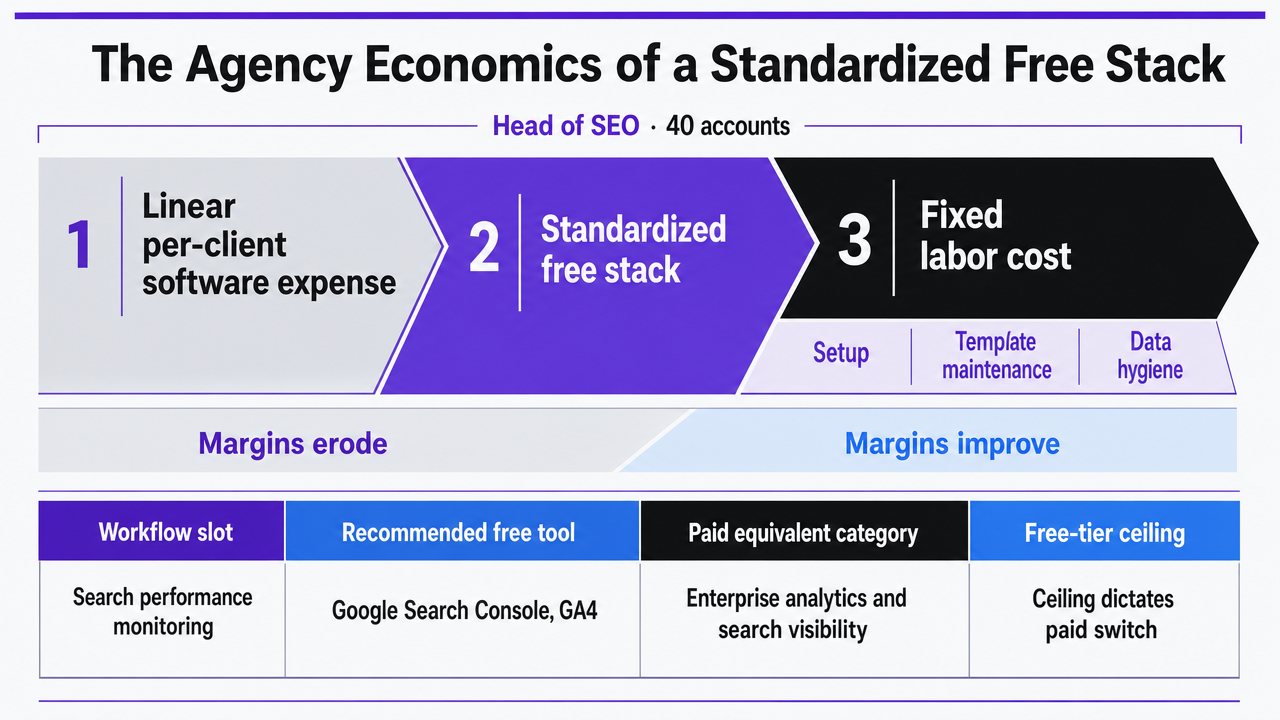
A standardized free stack is valuable not because it costs nothing, but because it transforms a linear, per-client software expense into a fixed labor cost associated with setup, template maintenance, and data hygiene. For an Head of SEO managing 40 accounts, this shift can mean the difference between delivery margins that erode with each new client and those that improve.
The table below outlines each workflow slot, its recommended free tool, the equivalent paid-tool category, and the free-tier ceiling that dictates when a paid solution becomes necessary. Paid-tool categories are presented as ranges due to the wide variability in agency negotiations 2, 4, 9.
| Workflow Slot | Recommended Free Tool | Paid Equivalent Category | Free-Tier Ceiling |
|---|---|---|---|
| Search performance monitoring | Google Search Console, GA4 | Enterprise analytics and search visibility suites | 16-month GSC data window 9 |
| Technical audit | Screaming Frog free | Site crawlers and SEO platforms with unlimited URL crawls | 500 URLs per crawl 2 |
| Keyword and content discovery | Google Keyword Planner, Trends, Autocomplete | Paid keyword databases with exact-volume data | Banded volume ranges; ad-account link required 7 |
| UX and behavioral signals | Microsoft Clarity | Session-replay and heatmap platforms with seat pricing | No hard cap disclosed in supplied research 5 |
| Reporting consolidation | Looker Studio | White-label agency reporting platforms | Community-connector reliability and query load 6 |
| Workflow automation between tools | Zapier free tier | Paid automation and iPaaS subscriptions | 100 tasks per month 4 |
Two specific ceilings frequently drive agency budget discussions. The 500-URL cap for Screaming Frog necessitates a paid license once a client's site exceeds this limit 2. Similarly, Zapier's 100-task monthly limit becomes a bottleneck for agencies attempting to automate reporting refreshes and technical alerts across a growing client roster 4. Most other tools in this table can remain free for extended periods.
Connecting the Stack: Zapier Free Tier, n8n, and Looker Studio as Glue
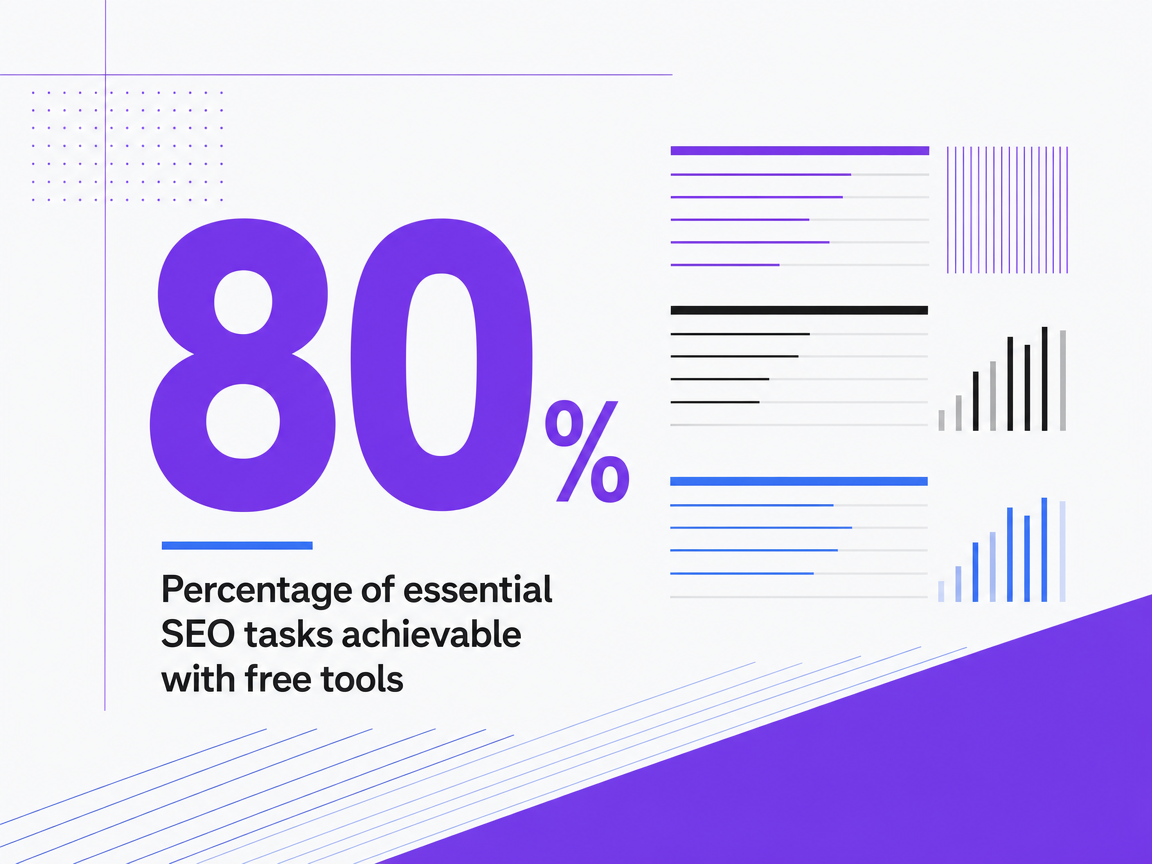
While the free tools discussed each excel in their specific workflow slots, they don't inherently communicate with each other. This handoff point determines whether a standardized free stack scales efficiently or becomes a manual export spreadsheet. It also defines the analytical limits of the entire approach. Approximately 80% of essential SEO tasks—such as indexation monitoring via Search Console, traffic analysis through GA4, and technical audits using Screaming Frog's free 500-URL crawl—are achievable with free tools for small teams performing core workflows 2. The remaining 20% primarily involves automation and coordination.
Zapier's free tier is a common initial choice for connectors. It offers 100 tasks per month 4, which dictates scalability. For example, a single Zap pushing a GSC coverage alert to a client's Slack channel consumes one task per trigger. Ten clients with weekly alerts would use 40 tasks. Adding automated Looker Studio refresh notifications and monthly report distribution quickly exhausts this limit within the first two weeks of the month. The free tier is suitable for prototyping automations and managing a few high-value alerts, but it cannot sustain the connective tissue for a 40-account roster.
n8n is a notable free alternative because it is self-hostable and doesn't meter task volume in the same way 6. The cost shifts from a per-task subscription to engineering hours for setup and maintenance, a trade-off viable for agencies with technical resources but not for those without.
Looker Studio makes the integration visible by ingesting GSC, GA4, and Sheets outputs into a single client-facing interface 6. This narrows the automation layer's role to moving data into a warehouse, refreshing dashboards, and alerting on exceptions. This focused scope allows free automation to remain viable longer than if every workflow step required a Zap.
Where Free Stacks Hit Their Ceiling
A well-designed free stack effectively addresses the tool problem but does not resolve the coordination challenge. This distinction marks the ceiling for any Head of SEO managing a growing client roster.
The mechanical limitations are clear:
- Screaming Frog's 500-URL cap necessitates a paid license when a client's site exceeds it 2.
- Zapier's 100-task monthly limit restricts automation for approximately ten actively alerting clients 4.
- GSC's 16-month data window requires external warehousing for long-term analysis 9.
Each of these limitations has a workaround, but each workaround incurs either financial cost or engineering hours.
The more significant ceiling is workflow orchestration across multiple clients. Free tools generate data but do not prioritize which of 40 accounts needs a senior strategist's attention, route recommendations for approval, or connect execution to KPI movements. This coordination layer is where free stacks fall short and where AI-coordinated execution platforms become relevant. These platforms don't replace GSC, GA4, or Screaming Frog; instead, they operate above them, interpreting signals, ranking priorities across the roster, and routing work for human approval before publication.
Agencies that view the free stack as the data foundation and integrate a coordination layer above it—rather than replacing free tools with expensive platforms that duplicate monitoring functions—can maintain the economic advantages that made the free stack appealing. Vectoron offers a solution for this coordination layer when these ceilings are reached.
 Percentage of essential SEO tasks achievable with free tools
Percentage of essential SEO tasks achievable with free tools
Frequently Asked Questions
References
- 1.The Best Free & Paid SEO Software Tools For Agencies in 2026.
- 2.13 Best SEO Automation Tools in 2026 (Free + Paid).
- 3.The Best Free SEO Tools Every Marketer Needs in 2026.
- 4.The Ultimate List of Free SEO Automation Tools for 2025.
- 5.Free SEO Tools List: 35 Best Free Tools for Keyword Research ....
- 6.Best SEO Automation Tools Free: 2026 Guide for Students.
- 7.24 best SEO tools I'm using in 2026 (free + paid).
- 8.Free SEO Tools for Agencies 2026 - TheFreeAITools.
- 9.Best SEO Tools for Agencies in 2026: What We Actually Use at OLW.
- 10.Bing Webmaster Guidelines.