
Key Takeaways
- Google Search Console anchors the truth layer with unlimited keywords on owned sites and a 2–3 day lag, making it the only free tracker worth running daily 10.
- Looker Studio turns Search Console data into cloned client dashboards for free, replacing per-client rebuilds that quietly drain analyst hours across a roster 5.
- Ranktracker.app repackages 500 GSC-fed keywords into cleaner trend views, useful when a client wants a simpler dashboard than Looker Studio produces 4.
- Seobility's 10-keyword GSC-fed tier is a demo slot for prospect diagnostics, not a production tracker for active client accounts 4.
- Ubersuggest supplies 25 competitor keywords on a weekly independent crawl, closing the non-owned domain gap Search Console cannot see 11.
- SE Ranking's permanent 5-keyword free slot works as a competitor spot-check, while its 14-day trial fits a timed evaluation against a real client roster 5, 3.
- Rank Matrix and KeyRank sit in the same weekly-crawl slot as Ubersuggest and earn their place as cross-verification when a position number gets disputed 11.
- SEO PowerSuite Rank Tracker runs locally on an analyst laptop for migration audits and one-off reviews, not shared client reporting 3.
- SEO Review Tools handles ten-second browser spot-checks when a client asks where they rank for a single query in a single market 9.
- Search Console is now the only free surface reporting AI Overview and AI Mode impressions, with hourly and daily granularity on generative features 1.
Why a Free Rank Tracking Stack Is an Architecture Problem, Not a Tool List
A Head of SEO managing 25 or 100 client accounts does not have a rank tracking problem. They have a data architecture problem dressed up as a procurement decision. The question is not which free rank tracker is best. The question is which layer of the tracking stack a given tool actually belongs in, and how many analyst hours per client per reporting cycle the seams between those layers cost.
That framing matters because the free tool ecosystem is not flat. Google Search Console sits at the base as the first-party source of impressions, clicks, CTR, and average position across Search, Discover, and Google News 7, and industry testing continues to identify it as the only free tracker worth running daily 10. Everything else, including Ranktracker.app, Seobility, Ubersuggest, SE Ranking's free tier, Rank Matrix, KeyRank, SEO PowerSuite's desktop build, SEO Review Tools, and Looker Studio, either pulls from Search Console or fills a specific gap Search Console does not cover 4, 5, 11.
The 13 tools that follow are grouped by the gap each one closes, not by feature parity. The goal is a working stack an agency can actually run, with a clear-eyed view of where the free tier ceiling forces a decision about paid tools, automation, or an execution layer that consumes rank data instead of producing more of it.
 Cost of Looker Studio for Rank Tracking
Cost of Looker Studio for Rank Tracking
The Layered Stack: How 13 Free Tools Actually Fit Together
Five functional layers sit between raw SERP data and a client-ready report. Each free tool in this article belongs to exactly one of them, and the seams between layers are where analyst hours disappear.
- The truth layer is first-party Google data: Search Console for owned properties, treated as the diagnostic baseline for every account 6.
- The reporting layer turns that raw data into something a client will read, with Looker Studio as the 100% free surface most agencies underuse 5.
- The GSC-fed freemium layer — Ranktracker.app and Seobility — repackages Search Console data into keyword views with delays and caps 4.
- The independent SERP layer — Ubersuggest, SE Ranking's free tier, Rank Matrix, KeyRank — runs its own crawls at weekly cadence and small keyword counts 11, 5.
- The desktop and utility layer — SEO PowerSuite Rank Tracker and SEO Review Tools — covers spot-checks and one-off audits 3, 9.
A sixth layer sits above all of them: the workflow layer that consumes rank data rather than producing it. That is where free stacks either integrate or fracture at 25+ accounts.
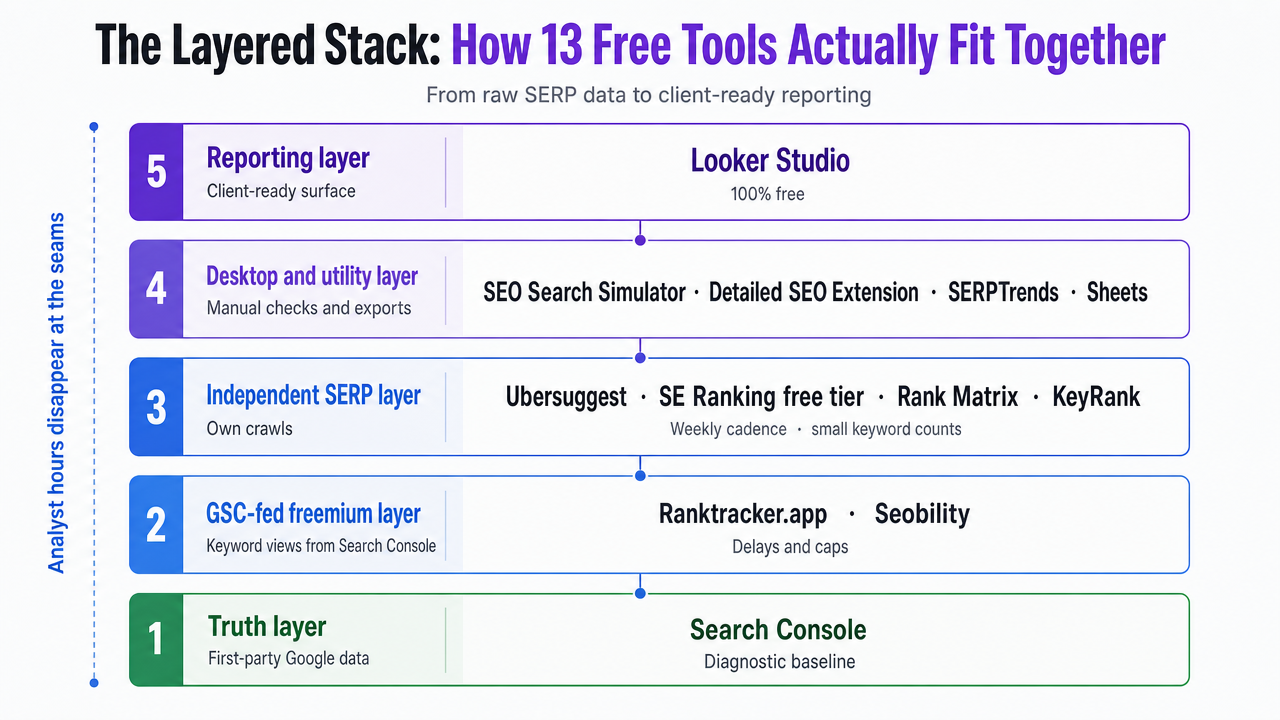 Visualize the five functional layers of a free rank tracking stack described in this section, mapping each named tool to its layer
Truth Layer: First-Party Ranking Data From Google
Google Search Console — Unlimited Keywords, 2–3 Day Lag
Every other tool in this article is either downstream of Search Console or exists to fill a gap Search Console does not cover. That is the operational reason it anchors the truth layer: it reports first-party Google data with no keyword cap on verified properties, at $0, refreshed daily with a 2–3 day lag 10. No third-party crawler can match that combination on owned inventory, because no third-party crawler has the query log.
The Performance report is the working surface. It exposes clicks, impressions, CTR, and average position across Search, Discover, and Google News, filterable by query, page, country, device, and date 7. For an agency running 25 accounts, that means every client site produces a defensible ranking dataset the moment the property is verified — no keyword lists to seed, no crawl budget to ration.
The cap comparison is stark:
- On owned properties, Search Console tracks unlimited keywords 10.
- The next-widest free tier, Ranktracker.app, tops out at 500 GSC-fed keywords 4.
- Ubersuggest caps free users at 25 keywords with weekly updates 11.
- Seobility allows 10 4.
- SE Ranking's free trial slot allows 5 5.
Two constraints matter for stack design. Search Console reports only owned properties, so it produces no competitor ranking data. And the 2–3 day lag means it cannot flag same-day volatility during algorithm updates 10. Both gaps get closed downstream — not by replacing the truth layer.
Looker Studio — The Free Reporting Surface on Top of GSC
Search Console holds the data. Looker Studio turns it into something a client will actually open. The connector is native, the surface is 100% free, and it produces accurate Google position tracking for specific queries at any cadence an agency wants to schedule 5.
This is where most agency stacks quietly bleed hours. Analysts export Search Console CSVs into spreadsheets, paste them into slide decks, and rebuild the same visualizations every month. A single Looker Studio template, connected once per client property, replaces that cycle. Query-level position trends, page-level CTR, device splits, and country breakdowns all render from the same first-party pipe that feeds the Performance report 7.
The reporting-layer discipline is to build the template once and clone it across accounts, not to rebuild dashboards per client. A 25-account roster running one shared template turns monthly reporting from a per-client production task into a per-client review task. That distinction is the entire margin argument for a free reporting layer.
What Looker Studio does not do: pull competitor ranks, poll SERPs on demand, or track local pack positions. Those gaps belong to different layers.
AI-Visibility Layer: What GSC Now Reports for AI Overviews and AI Mode
The definition of "rank" changed in 2026. Search Console now exposes impressions and related metrics for AI Overviews, AI Mode, and generative AI features in Discover, with breakouts by pages, countries, devices, and dates at hourly, daily, weekly, and monthly granularity 1. That is a material expansion of what the free truth layer covers, and it lands before any third-party tracker has a comparable first-party pipe into those surfaces.
For an agency, the practical consequence is that AI-visibility tracking has already been absorbed into the same property verification that produces classic search rank data. No new tool contract. No new keyword cap. The same Performance report surface that reports clicks, impressions, CTR, and average position on traditional Search now reports impression volume inside generative features 1, 7. A client property that was verified last year for organic reporting is already producing AI-surface data this year.
Two interpretation shifts matter:
- An "impression" inside an AI Overview is not equivalent to a blue-link position, and mixing the two in a client dashboard without segmentation will mislead. The generative reports need their own row in the Looker Studio template, not a merge with Search results.
- The hourly and daily granularity available for generative AI features 1 is finer than Search Console's traditional 2–3 day rank lag, which means the AI-visibility layer is actually the fastest-refreshing free signal in the stack for accounts where AI Overviews trigger on core queries.
No free third-party tracker replaces this. The data lives at Google, and Search Console is the only free surface that exposes it.
Test Full-Scale Rank Tracking and Reporting
Monitor keyword positions live and publish real ranking insights during your unrestricted 7-day trial.
GSC-Fed Freemium Trackers: Where the Data Comes From Search Console Anyway
Ranktracker.app — 500 GSC-Fed Keywords Free
Ranktracker.app's free tier tops out at 500 keywords, and every one of them is fed from Google Search Console data rather than an independent SERP crawl 4. That is the honest read: the tool is a repackaging layer, not a second source of truth. The queries, impressions, and positions that appear in its interface came from the same Performance report an agency could pull directly 4.
What the repackaging buys is presentation. A 500-keyword ceiling covers most single-brand accounts without segmentation, and the interface renders keyword-level trend views that Search Console does not surface as cleanly. The trade is the delay. Because the data pipes through GSC, Ranktracker.app inherits the 2–3 day lag baked into Search Console's Performance report, plus any additional refresh interval on its own side 4.
Use it when a client wants a simpler keyword dashboard than Looker Studio produces and 500 keywords is enough. Do not use it for competitor tracking, same-day volatility, or accounts where the analyst already builds a Looker Studio template — the repackaging pays for itself only when it replaces manual dashboard work.
Seobility — 10 Keywords Free, GSC-Fed
Seobility's free tier allows 10 keywords, drawn from the same Search Console data pipe as Ranktracker.app 4. Ten keywords is not an agency-scale allocation. It is a demo slot.
The practical use case is narrow: a single high-priority query set for a new account, or a lightweight monitoring layer on a prospect site during pitch. Any agency treating Seobility as a client-wide tracker will hit the ceiling before the first monthly report and either upgrade or stitch multiple free accounts together — a stitching pattern that consumes exactly the analyst hours a free stack is supposed to save.
Run it for spot demos and prospect diagnostics. Skip it for production tracking on active accounts.
Independent SERP Freemium Trackers: Small Caps, Weekly Refresh
Ubersuggest — 25 Keywords, Weekly Updates
Ubersuggest's free tier allows up to 25 tracked keywords refreshed weekly 11. Unlike the GSC-fed trackers, its data comes from an independent crawl, which means it produces competitor ranks and non-owned domain positions that Search Console cannot see. That is the entire reason it earns a slot in a free stack — not the keyword ceiling, which is thin.
A weekly refresh is the operational constraint. For accounts where the reporting cadence is monthly and the client cares about competitor movement on a handful of head terms, 25 keywords polled weekly is workable. For accounts sensitive to same-day SERP volatility or running deep long-tail portfolios, the cap forces triage before the tool is useful.
Use Ubersuggest to monitor a curated competitor keyword set per account. Do not use it as a client's primary tracker.
SE Ranking — 5 Free Keywords, 14-Day Agency Trial
SE Ranking is built around agency and service-business workflows, and the free access it exposes reflects that: a permanent 5-keyword tracking slot for hands-on evaluation 5, plus a 14-day trial of the full agency platform 3. Five keywords is not a production allocation. It is a proof-of-concept slot for a Head of SEO stress-testing the platform against a live account before a paid decision.
The 14-day trial is where the actual agency evaluation happens. Multi-site support, white-label reporting, and local SERP depth — the exact gaps free tools do not close — become testable inside a two-week window against a real client roster. Trial pricing after conversion is a separate procurement question outside this article's scope.
Run the 5-keyword slot as a permanent competitor spot-check on one strategic account. Time the 14-day trial to a specific evaluation window, not a passive signup.
Rank Matrix and KeyRank — Weekly Checks, Narrow Free Plans
Rank Matrix and KeyRank sit in the same functional slot as Ubersuggest: independent SERP crawls, weekly refresh, narrow free plans 11. Neither replaces Search Console, and neither scales to a full client roster on the free tier. What they offer is redundancy — a second data source when a single independent tracker's numbers need a cross-check against a competitor claim or a client dispute over movement.
The practical use is redundancy, not primary tracking. A weekly Rank Matrix or KeyRank pull on the same competitor keyword set already running in Ubersuggest gives an analyst two independent reads before defending a position number in a QBR.
Run one of the three as primary competitor tracking. Keep a second in reserve for cross-verification. Do not stitch all three into the same monthly report — the analyst hours spent reconciling three weekly crawls erase the free-tier savings.
Desktop and Utility Layer: Free Tools for Spot-Checks and Audits
SEO PowerSuite Rank Tracker — Free Desktop Tier
SEO PowerSuite's Rank Tracker runs as a desktop application with a free tier and a paid step-up around $29.10/month for the professional build 3. That desktop architecture is the defining trait, not a footnote. The free version installs locally, runs SERP checks from the analyst's own machine, and stores project files on that machine — which means no cloud sync, no shared dashboards, and no automated client access.
The operational read is narrow. A desktop tracker is a one-analyst utility for ad-hoc audits: pulling a fresh keyword rank set during a technical review, checking a migration against baseline positions, or validating a competitor claim before a strategy call 11. Multi-analyst teams cannot share the same project file live, which rules it out as a client-wide production tracker.
Run it on the analyst's laptop for audit work. Do not build recurring client reporting on it.
SEO Review Tools — Browser-Based Spot Checks
SEO Review Tools sits in the browser as a set of free single-query rank checkers with no account, no keyword list, and no ongoing tracking 9. There is nothing to configure and nothing to store — which is exactly its slot in the stack.
The use case is the ten-second answer. A client emails asking where they rank for one query in one market, and an analyst needs to confirm before a call. Pulling a Search Console report or spinning up a project in a desktop tracker is overkill for that. A browser spot-check closes the loop and moves on.
Use it for one-off verifications and prospect diagnostics. Do not treat it as a data source for any recurring report.
Free Tier Ceilings at Agency Scale
The layered stack only works if the ceilings are visible before an account rolls onto it. The matrix below consolidates every free tier discussed so far into a single procurement view: keyword cap, refresh cadence, data source, and the specific agency job each tool actually does.
| Tool | Free Keyword Cap | Refresh / Lag | Data Source | Primary Agency Use Case ||---|---|---|---|---|| Google Search Console | Unlimited on owned sites 10| Daily, 2–3 day lag 10| First-party Google | Truth layer for every verified property || Looker Studio | Inherits GSC 5| Inherits GSC | GSC connector | Reporting layer, cloned templates || Ranktracker.app | 500 4| GSC lag plus refresh delay 4| GSC-fed | Simple keyword dashboard, single brand || Seobility | 10 4| GSC-fed 4| GSC-fed | Demo slot, prospect diagnostic || Ubersuggest | 25 11| Weekly 11| Independent crawl | Curated competitor set || SE Ranking (free slot) | 5 5| Platform default | Independent crawl | Permanent competitor spot-check || SE Ranking (trial) | Full platform, 14 days 3| Platform default | Independent crawl | Timed evaluation vs. paid || Rank Matrix | Narrow free plan 11| Weekly 11| Independent crawl | Cross-verification || KeyRank | Narrow free plan 11| Weekly 11| Independent crawl | Cross-verification || SEO PowerSuite Rank Tracker | Desktop free, $29.10/mo step-up 3| Manual runs | Desktop crawl | Analyst audits, migrations || SEO Review Tools | Single-query checks 9| On demand | Browser | Ten-second verifications |
The economics translate directly into analyst hours per client per reporting cycle. An agency running 25 accounts on Search Console plus a cloned Looker Studio template pays the setup cost once, then absorbs review time per account. Add a 25-keyword Ubersuggest competitor set per client and the weekly refresh becomes 25 pulls to reconcile against monthly cadence. Stitch in a second independent tracker for cross-verification and the reconciliation work doubles. The free stack is defensible up to the point where seam maintenance — export, merge, deduplicate, chart — starts consuming more analyst time per client than a paid consolidation would.
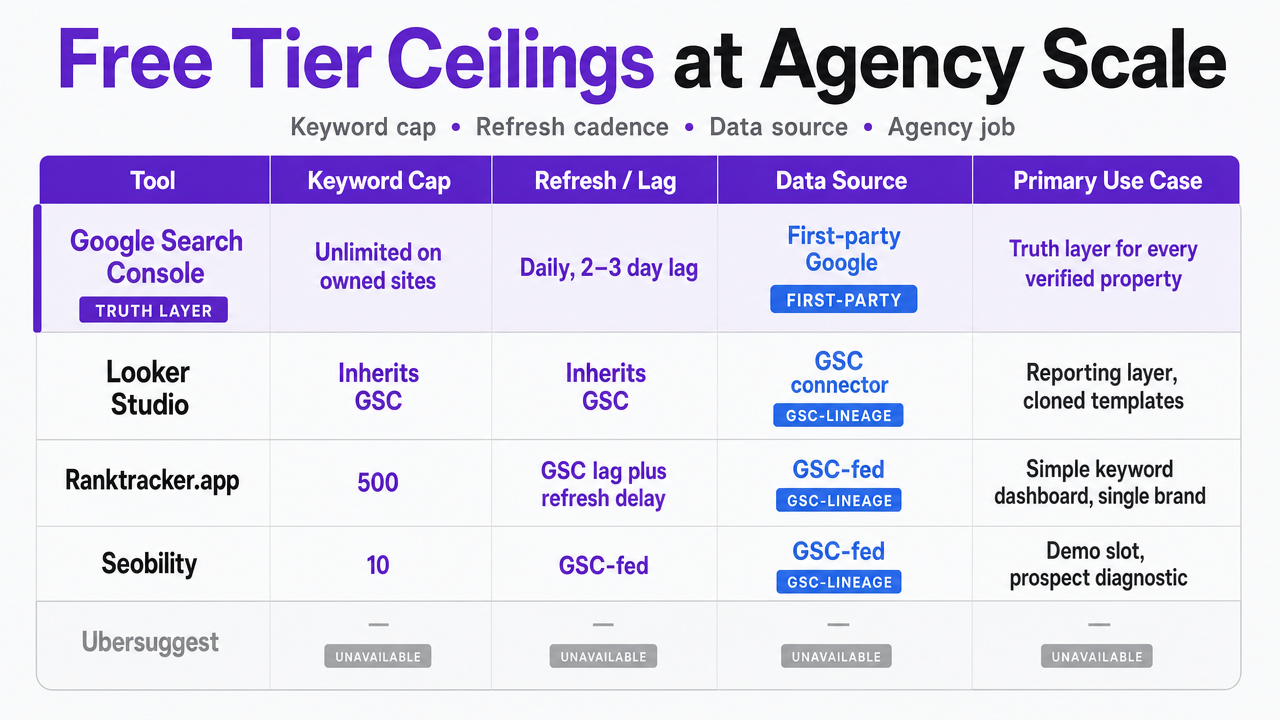 Render the comparison table in this section as a scannable matrix visual showing each tool's keyword cap, refresh cadence, data source, and primary use case
Scale Your Rank Tracking and SEO Operations with Unified AI Automation
Discuss how coordinated rank tracking, automated reporting, and approval-first AI workflows can drive measurable efficiency for agencies managing SEO at scale. See how Vectoron supports multi-client oversight without expanding your team.
Where the Free Stack Breaks: Local Packs, White-Label Reporting, Competitor SERPs
Three gaps consistently break a free-only rank tracking stack, and none of them get fixed by adding another free tool to the stitch.
- The first is local pack tracking. Search Console reports position and impressions on owned properties 7 but does not render a geo-gridded view of local pack rankings across neighborhoods or ZIP codes. That gap matters most for multi-location operators — home services, dental groups, senior living portfolios — where the same brand competes against different local sets in each market. Paid trackers earn their license fees on local SERP depth and heatmap views that no free tier in this article replicates 2.
- The second is white-label client reporting. Looker Studio produces client-ready dashboards on GSC data 5, but branded PDF exports, scheduled deliveries, and per-client access controls sit behind paid platforms designed for agency workflows 2. An agency running 25 accounts on Looker Studio still owns the template maintenance, permissioning, and delivery cadence as analyst work.
- The third is competitor SERP depth. Ubersuggest's 25-keyword weekly cap 11 and SE Ranking's 5-keyword free slot 5 do not scale to portfolio-wide competitor monitoring across a full roster. The free stack tracks the client. It does not track the market around the client.
If You Manage 25+ Client Accounts: The Workflow Layer That Consumes Rank Data
Scope shift: this section addresses agency operators running 25 or more client rosters, not single-brand SEO teams. The economics change at that account count, and the free stack described so far starts producing more analyst reconciliation work than it saves.
At 25 accounts, the workflow layer is where a stack either compounds or fractures. Search Console holds the truth data 6. Looker Studio renders it 5. Ubersuggest, Ranktracker.app, and the freemium trackers fill the competitor and repackaging gaps 4, 11. But nothing in that stack decides which movement matters, which client gets flagged, or which page gets updated first. That decision work sits on the Head of SEO and the analyst bench.
The workflow layer consumes rank data as input to prioritization, not as output for reporting. An AI marketing execution platform like Vectoron reads Search Console signals, ranks recommendations against pipeline data, and routes each one through a Command Center for human approval before execution — turning rank movement into ranked next actions rather than another dashboard row. That is a different category than any tracker in this article, and it is the honest place a free rank stack hands off when seam maintenance stops paying for itself.
Direct Guidance: Which Tool for Which Job
Verify every client property in Search Console first. That is the truth layer, and unlimited keyword coverage on owned sites at a 2–3 day lag 10 means no other tool earns a slot until this one is running. Clone a single Looker Studio template across the roster for reporting 5. Do not rebuild dashboards per client.
For competitor SERPs, pick one independent tracker — Ubersuggest at 25 keywords weekly 11 — and keep a second in reserve for cross-verification, not parallel reporting. Use Ranktracker.app's 500 GSC-fed keywords 4 when a client wants a simpler keyword view than Looker Studio produces. Skip Seobility's 10-keyword tier 4 outside prospect demos.
Run SEO PowerSuite Rank Tracker on an analyst laptop for migration audits 3. Use SEO Review Tools for ten-second query checks 9. Time SE Ranking's 14-day trial 3 to a real evaluation window. For AI Overview visibility, the answer is Search Console — nothing else is closer to the data 1.
Frequently Asked Questions
References
- 1.Introducing Search Generative AI performance reports in Search Console.
- 2.13 Best Rank Tracking Tools For 2026 (Tried And Tested).
- 3.15 Best Rank Tracking Tools in 2026 - Airefs.
- 4.Best 12 SERP Rank Tracking Tools (2026) & 2 Free Ones!.
- 5.14 best rank tracker software I'm using for SEO in 2026.
- 6.15 Best Rank Tracking Software We're Using for 2026.
- 7.A Guide to Using Google Search Console Performance Tools.
- 8.Ahrefs Free Rank Checker And....
- 9.Best Free Rank Tracker: Top Tools Compared (2026) - GrandRanker.
- 10.Best Rank Tracking Software 2026: 11 Tools Tested.
- 11.Find 10 Best Rank Tracker Software Free for 2026.