
Key Takeaways
- Schema markup only creates eligibility for rich results, never guarantees them, so treat any example as one input within a four-stage workflow Google requires 2.
- Match templates to the Google Search Gallery rather than Schema.org alone, since only a subset of types render as rich results and feature guides carry rules the vocabulary omits 3.
- Copy-ready JSON-LD exists for Article, BreadcrumbList, LocalBusiness, Product, Review, FAQPage, QAPage, Event, JobPosting, Dataset and ClaimReview, each with distinct required properties and parity traps 4, 7, 8.
- Run the deploy-validate-monitor loop: validate with Rich Results Test, confirm rendering via URL Inspection, then watch Search Console after deployments, template changes, and traffic shifts 1, 11.
- Governing a template library across clients requires canonical templates, version control, content-parity contracts, and named owners so junior staff can deploy while seniors review exceptions 2, 3.
- Most eligibility losses trace to four audit-detectable patterns: content-parity drift, type misclassification, stale time-sensitive data, and inauthentic review ratings 2, 7, 11.
Eligibility, Not Display: What a Schema Example Actually Buys You
A schema markup example is a template, not a rich result or a ranking lever. Google's guidance clarifies that structured data enables a feature to be present, but it does not guarantee its appearance2. This distinction is crucial for SEO teams implementing JSON-LD snippets.
Google provides publisher-reported outcomes to illustrate how eligibility can translate into display. For instance, Rotten Tomatoes pages with structured data saw a 25% higher click-through rate, and Food Network pages recorded a 35% increase in visits1. These figures are specific to publishers, templates, and URLs, not universal uplift curves. Google recommends before-and-after testing, as traffic changes can stem from factors unrelated to markup1.
A schema example is an input to a four-stage workflow: the markup must align with a Google-supported feature, the visible content must match the markup, the implementation must validate, and the deployed page needs continuous monitoring in Search Console for status changes2. Bypassing any stage renders the snippet ineffective. Successfully navigating all four makes the page a candidate for rich results, which is the maximum any example can promise.
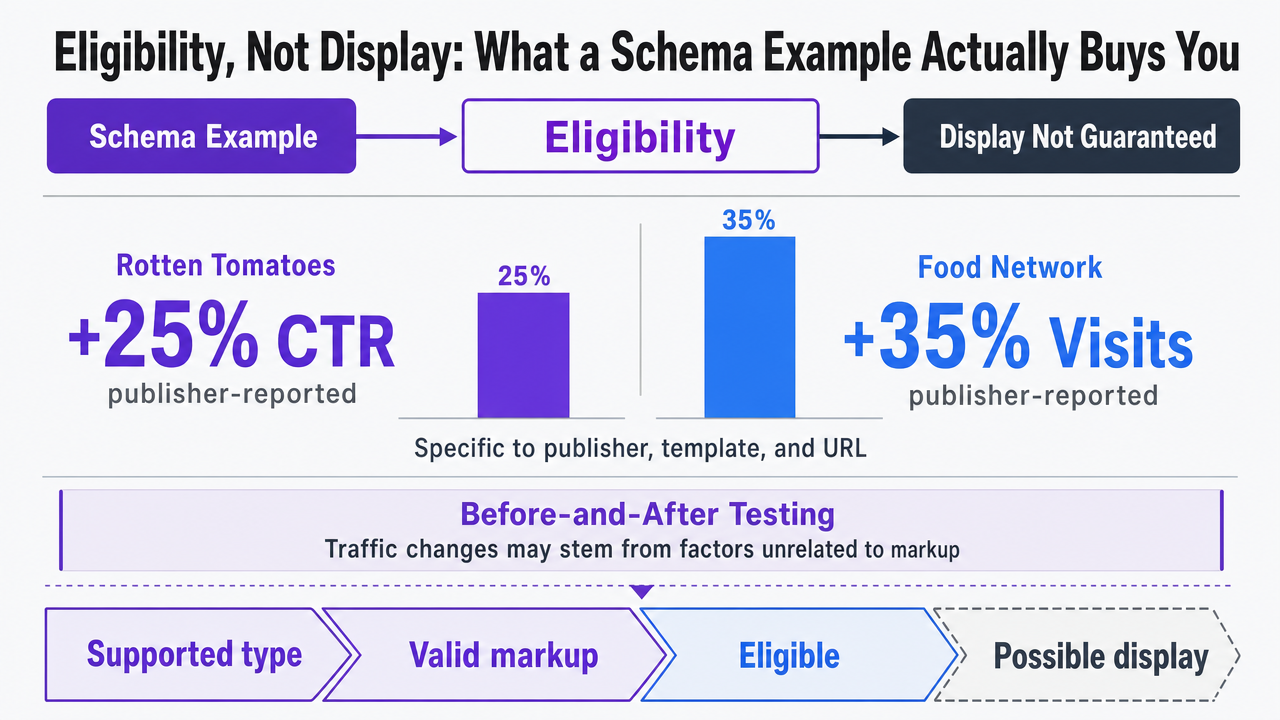 Visualize the publisher-reported CTR and visit uplift figures cited in this section as a stat comparison, since the section explicitly names these numbers with citations
Matching Schema.org Examples to Google-Supported Rich Result Features
Schema.org offers hundreds of types and thousands of properties, but Google Search renders a much smaller subset as rich results. The authoritative list resides in the Search Gallery, not Schema.org itself3. This discrepancy is the initial filter for any example library. A valid HowTo, Course, or SoftwareApplication block might parse correctly in a validator but still yield no visual enhancement in Search if the feature was retired or never supported for that type3.
For most agency portfolios, the practical shortlist includes Article, BreadcrumbList, LocalBusiness, Product, Review and AggregateRating, FAQPage, QAPage, Event, JobPosting, Dataset, and ClaimReview3. Each Search Gallery entry links to a feature-specific guide detailing required and recommended properties, along with eligibility rules beyond the vocabulary definition3. A template built solely from Schema.org will miss these crucial rules, whereas one based on the Google feature guide will not.
The process for selecting a schema example is sequential:
- Confirm the page type corresponds to a current Search Gallery feature.
- Verify the feature is supported for the target country and search surface.
- Only then should a JSON-LD example be copied and tailored to the visible content2, 3.
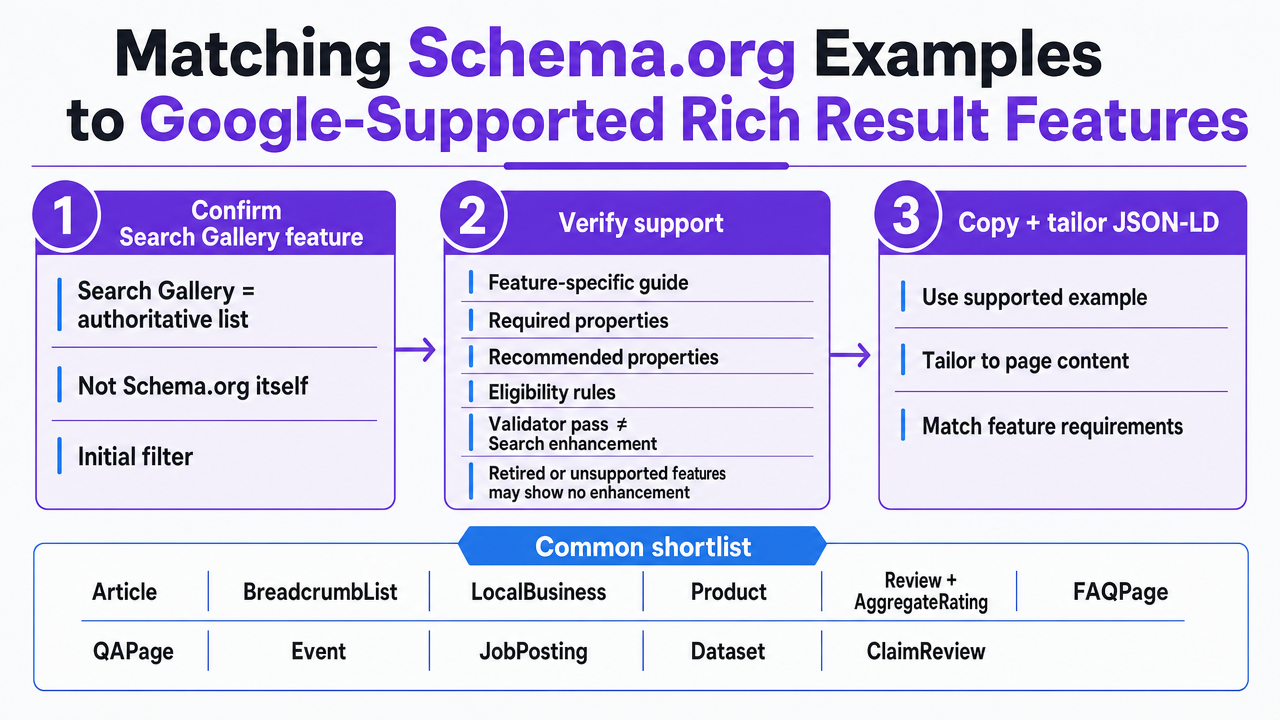 Visualize the three-step selection sequence the section describes (confirm Search Gallery feature, verify support, then copy and tailor JSON-LD) as a process infographic
Test Schema Markup Examples With Real Content Live
Validate and deploy schema-rich content for accurate rich snippet performance—risk free, using actual site data.
Copy-Ready JSON-LD Examples by Rich Result Feature
Article: Recommended Properties and the Author-Parity Trap
Article is frequently deployed first and audited last by content teams. Google's Article guide lists no required properties, which can create a false sense of security; a minimal block will validate, but completeness is key for eligibility4. A robust template should include headline, image, datePublished, dateModified, author (as Person or Organization with a url), and a publisher with name and logo.
{ "@context": "https://schema.org", "@type": "Article", "headline": "How to Use a Schema Markup Example for Rich Snippets", "image": ["https://example.com/img/hero.jpg"], "datePublished": "2026-01-15T08:00:00-05:00", "dateModified": "2026-02-02T10:30:00-05:00", "author": [{"@type": "Person", "name": "J. Reyes", "url": "https://example.com/authors/jreyes"}], "publisher": {"@type": "Organization", "name": "Example", "logo": {"@type": "ImageObject", "url": "https://example.com/logo.png"}}}
A common pitfall is author parity. Google requires publishers to include every author displayed on the page and to use specific types when applicable, rather than the generic Thing4. If a templated byline in JSON-LD lists one author while the visible page credits two, it violates content parity under general guidelines2.
BreadcrumbList: The Two-ListItem Minimum and Hierarchy Fidelity
BreadcrumbList has a strict eligibility rule: it must contain at least two ListItem entries5. Single-item breadcrumbs will validate syntactically but will not qualify for the rich result enhancement.
{ "@context": "https://schema.org", "@type": "BreadcrumbList", "itemListElement": [ {"@type": "ListItem", "position": 1, "name": "Guides", "item": "https://example.com/guides"}, {"@type": "ListItem", "position": 2, "name": "Schema Markup", "item": "https://example.com/guides/schema"} ]}
The second rule is hierarchy fidelity. The position order and name values must accurately reflect the visible navigation path on the page. Agencies generating breadcrumbs from URL slugs instead of the rendered trail may produce lists that validate but misrepresent the site structure, leading to a content-parity failure under general guidelines2. Validation should involve the Rich Results Test and confirmation with URL Inspection post-deployment5.
LocalBusiness: Identity, Hours, and Multi-Location Consistency
LocalBusiness often sees eligibility losses due to inconsistency across agency portfolios. Each branch page requires its own JSON-LD block with location-specific identity, address, geo-coordinates, phone, hours, and URL. A corporate template reusing the same telephone or openingHoursSpecification across all franchise pages will validate at the file level but misrepresent individual branches, which Google considers a content-parity failure2, 6.
{ "@context": "https://schema.org", "@type": "DentalClinic", "name": "Example Dental \u2014 Midtown", "url": "https://example.com/midtown", "image": "https://example.com/img/midtown.jpg", "telephone": "+1-555-0137", "address": {"@type": "PostalAddress", "streetAddress": "420 5th Ave", "addressLocality": "New York", "addressRegion": "NY", "postalCode": "10018", "addressCountry": "US"}, "geo": {"@type": "GeoCoordinates", "latitude": 40.7527, "longitude": -73.9847}, "openingHoursSpecification": [{"@type": "OpeningHoursSpecification", "dayOfWeek": ["Monday","Tuesday","Wednesday","Thursday","Friday"], "opens": "08:00", "closes": "18:00"}], "priceRange": "$$"}
Google advises publishers to include required properties, adhere to general and feature-specific guidelines, validate with the Rich Results Test, inspect live URLs, and submit a sitemap for quick discovery of updates to hours and location data6. Structured data supplements, but does not replace, accurate business profiles or crawlable location pages6. For agencies managing numerous location pages, an operational control involves a per-branch data source feeding the template at build time, rather than manual editing for each URL.
Product: Required Properties, Offer Accuracy, and Content Parity
Product markup involves a multi-layered rule set. Google requires adherence to general structured-data guidelines, Search Essentials, technical guidelines, and product-specific content rules for eligibility8. Required properties establish eligibility, while recommended properties expand what Google can display8.
{ "@context": "https://schema.org", "@type": "Product", "name": "Acme Field Jacket", "image": ["https://example.com/img/jacket.jpg"], "sku": "AFJ-2026-OLV", "brand": {"@type": "Brand", "name": "Acme"}, "offers": { "@type": "Offer", "url": "https://example.com/jacket", "priceCurrency": "USD", "price": "189.00", "availability": "https://schema.org/InStock", "priceValidUntil": "2026-12-31" }}
A frequent failure mode is offer drift, where the JSON-LD price or availability becomes out of sync with the rendered Product Detail Page (PDP) after a sale ends or stock changes. Google considers this a content-parity violation, and misleading product data can lead to loss of eligibility2, 8. The engineering solution is to render product JSON-LD from the same inventory source that populates the visible price, rather than from a cached CMS field.
Review and AggregateRating: ratingValue, reviewCount, ratingCount
Review snippets represent an average of combined ratings via AggregateRating, with individual testimonials using Review entries7. The three key properties for the snippet are ratingValue, reviewCount, and ratingCount7.
{ "@context": "https://schema.org", "@type": "Product", "name": "Acme Field Jacket", "aggregateRating": { "@type": "AggregateRating", "ratingValue": "4.6", "reviewCount": "184", "ratingCount": "212", "bestRating": "5", "worstRating": "1" }}
Authenticity is paramount for review markup eligibility. Fabricated, scraped, or self-serving ratings that do not reflect genuine user reviews can result in loss of rich-result eligibility or a manual action7. For agency teams, the audit rule is that every production ratingValue must map to a traceable, visible review source on the page, and the reviewCount should match the count displayed to users. Mismatches, even if they pass the Rich Results Test, fail Google's content-parity requirements2.
FAQPage vs QAPage: When Each Applies and Why Misclassification Kills Eligibility
FAQPage and QAPage describe distinct content models; misusing them can render markup irrelevant.
FAQPage : For a publisher-authored list of questions and single authoritative answers on a controlled page9.
QAPage : For a page centered on a user-submitted question with community answers, typical of forums or Q&A sites10.
{ "@context": "https://schema.org", "@type": "FAQPage", "mainEntity": [{ "@type": "Question", "name": "Does valid schema markup guarantee a rich result?", "acceptedAnswer": {"@type": "Answer", "text": "No. Valid markup creates eligibility only."} }]}
Incorrectly marking a publisher FAQ as QAPage, or a user-generated Q&A thread as FAQPage, creates misleading markup that can compromise eligibility9, 10. The classification decision should occur during content creation, not inferred from URL patterns. Both types require standard validation with the Rich Results Test, URL Inspection, and Search Console monitoring after indexing9, 10.
Event and JobPosting: Time-Sensitive Markup and Staleness Risk
Event and JobPosting types face a challenge that Article and LocalBusiness do not: data expiration. An event page with a past startDate or a job posting remaining live after the role is filled can lose eligibility, even if the JSON parses correctly11, 14.
{ "@context": "https://schema.org", "@type": "JobPosting", "title": "Senior SEO Strategist", "datePosted": "2026-02-01", "validThrough": "2026-04-01T23:59", "employmentType": "FULL_TIME", "hiringOrganization": {"@type": "Organization", "name": "Example", "sameAs": "https://example.com"}, "jobLocation": {"@type": "Place", "address": {"@type": "PostalAddress", "addressLocality": "Austin", "addressRegion": "TX", "addressCountry": "US"}}}
Google's JobPosting guide recommends validating with the Rich Results Test, previewing results, inspecting live URLs, and requesting re-validation after fixes14. The Event guide suggests a monitoring cadence: checking Search Console after initial deployment, after new template releases or code updates, and periodically during traffic analysis11. For agencies, automated expiry is key. validThrough for JobPosting and endDate for Event should be populated from the ATS or event system, and expired items should either return 404/410 or have their schema block removed.
Dataset and ClaimReview: Specialist Cases Agencies Should Scope Carefully
Dataset and ClaimReview are outside the typical commercial content library. Dataset markup describes pages about datasets, using Schema.org Dataset or equivalent DCAT structures, and should not be applied to ordinary articles or reports that merely contain statistics12. ClaimReview supports fact-checking pages and demands high accuracy; marking up claims or ratings that don't match the page's visible editorial content creates policy and trust issues13.
Both types require fixing invalid items, inspecting live URLs, requesting re-validation, and monitoring for increases in invalid items after site changes12, 13. They are not suitable for standard template rollouts. Agencies should reserve these for clients with legitimate dataset catalogs or editorially governed fact-check desks, treating each implementation as a bespoke engagement with senior review for every change.
The Deploy-Validate-Monitor Loop
Google's implementation workflow is a consistent loop across feature guides. The sequence involves:
- Adding applicable properties.
- Following general and feature-specific guidelines.
- Validating with the Rich Results Test during development.
- Deploying to a representative sample of pages.
- Inspecting live URLs to confirm Google's interpretation of the markup.
- Requesting recrawling where appropriate.
- Submitting an updated sitemap.
- Monitoring Search Console rich-result reports after indexing1, 11.
The Rich Results Test identifies syntax errors and missing required properties but cannot detect all quality issues. Markup can parse cleanly yet remain ineligible if it is misleading, hidden, incomplete, irrelevant, or inconsistent with visible content2. URL Inspection helps close this gap by showing how Googlebot renders the page and extracts structured-data items after JavaScript execution. For client-side injected JSON-LD, URL Inspection is critical for confirming markup reaches the index.
Monitoring cadence should be tied to trigger events. Google's Event guide specifies three triggers:
- After initial deployment.
- After releasing new templates or updating code.
- Periodically during traffic analysis11.
A template change affecting numerous URLs, a CMS upgrade regenerating breadcrumbs, or a sudden drop in rich-result impressions in Search Console all serve as triggers, indicating a potential template or content change that broke parity.
Search Console performance data completes the loop by showing rich result impressions, click-through rates, and average positions13. Agencies that prioritize these metrics as primary KPIs, rather than merely the presence of the JSON-LD block, can detect eligibility losses before clients do.
See Real-World Schema Markup Examples That Drive Rich Snippets
Request data-backed schema markup templates and implementation guidance tailored for large-scale SEO programs—streamline rich snippet deployment across multiple client sites with proven, enterprise-ready workflows.
If You Manage Schema Across a Portfolio: Template Library Economics
Governing a Schema Template Library Across Client Sites
For a Head of SEO managing schema across a large number of client URLs, the focus shifts from single-page implementation to governing a template library. The task evolves from "writing JSON-LD for this page" to "versioning, QAing, and deploying a reusable template across all pages matching its content model."
A governed library has four key components:
- A canonical template for each Google-supported feature, built from the matching feature guide (not just Schema.org), with labeled required and recommended properties, and a mapping to CMS fields3.
- A versioning scheme to track template versions across client sites, allowing phased rollouts for changes.
- A content-parity contract per template, specifying which visible elements must match JSON-LD properties, as inconsistency remains a primary cause of ineligibility2.
- Ownership. Each template needs a named reviewer for sign-offs and an owner for Search Console rich-result reports.
Junior staff deploy from the approved library, with senior reviewers intervening only for critical Rich Results Test errors, feature guide updates, or eligibility drops in Search Console1, 11. This division of labor enables scalable schema delivery without requiring a senior specialist for every client.
Per-Schema Build, Deploy, and Monitoring Cost Table
The table below uses relative time ranges and operational variables, as schema library economics vary based on CMS architecture, data sources, and client count. A consistent pattern across agency portfolios is that templated deployment significantly reduces per-site hours once a canonical template exists, shifting recurring costs from writing JSON-LD to monitoring Search Console reports1.
| Schema type | Template build (one-time) | Per-site deploy, specialist | Per-site deploy, templated | Validation cadence | Monitoring owner |
|---|---|---|---|---|---|
| Article4 | Medium | Hours | Minutes | On template or author-model change | Content ops lead |
| LocalBusiness6 | High | Hours per branch | Minutes per branch, data-driven | On hours, address, or branch change | Local SEO lead |
| Product8 | High | Hours per PDP | Minutes, inventory-fed | On price, availability, or feed change | Ecommerce SEO lead |
| FAQPage9 | Low | Hour | Minutes | On FAQ content edit | Content ops lead |
| Review/AggregateRating7 | Medium | Hours | Minutes, review-source-fed | On review-source or policy change | Reputation lead |
| JobPosting14 | Medium | Hours per role | Minutes, ATS-fed | On posting open, fill, or expiry | Recruiting ops or client |
| Event11 | Medium | Hours per event | Minutes, calendar-fed | After deployment, template changes, traffic analysis | Content ops lead |
Two patterns emerge:
- Templates linked to live data sources (e.g., inventory for Product, ATS for JobPosting, review platforms for AggregateRating) incur higher build costs but lower recurring costs, as expiry and parity are managed by the feed.
- Templates relying on manual content (Article, FAQPage) have lower build costs but higher editorial discipline costs, as parity can break with content edits if markup isn't updated2, 4.
Common Failure Modes and How Senior Reviewers Catch Them
Four common failure patterns account for most eligibility losses in agency portfolios, each with a distinct audit signature identifiable by a senior reviewer.
The first is content-parity drift. JSON-LD properties that no longer match visible page content—such as a stale price, a byline discrepancy, or breadcrumb name values derived from URL slugs instead of the visible trail—will pass syntax validation but fail Google's requirement for structured data to match visible content2. Reviewers detect this by spot-checking 3-5 live URLs per template using URL Inspection, comparing extracted fields against the rendered DOM, not just the CMS record1.
The second is type misclassification. This includes publisher FAQs marked as QAPage, user-generated Q&A threads marked as FAQPage, or generic articles assigned specialized types like Dataset or ClaimReview that don't align with the page's actual content model9, 10, 12, 13. The signature is a template copied from the wrong feature guide. Reviewers catch this during intake by confirming the content model against the Search Gallery before template work begins3.
The third is staleness in time-sensitive types. This includes expired JobPosting entries, Event pages with past startDate values, or Product offers that have outlived a sale8, 11, 14. Reviewers identify this with a monthly Search Console sweep for increases in invalid items for these templates and a feed-level audit to confirm expiry triggers are functioning.
The fourth is authenticity issues with Review and AggregateRating. ratingValue and reviewCount figures that do not correspond to visible reviews on the page can lead to loss of eligibility or a manual action2, 7. The audit involves reconciling that every rating in production maps to a source visible to users.
 CTR increase for Rotten Tomatoes with structured data
CTR increase for Rotten Tomatoes with structured data
Frequently Asked Questions
References
- 1.Intro to How Structured Data Markup Works | Google Search Central.
- 2.General Structured Data Guidelines.
- 3.Structured Data Markup that Google Search Supports.
- 4.Learn About Article Schema Markup | Google Search Central.
- 5.How To Add Breadcrumb (BreadcrumbList) Markup.
- 6.Local Business (LocalBusiness) Structured Data.
- 7.Review Snippet (Review, AggregateRating) Structured Data.
- 8.How To Add Product Snippet Structured Data.
- 9.How To Add FAQ Structured Data.
- 10.Q&A Page Structured Data.
- 11.Learn About Google Event Schema Markup.
- 12.Dataset.
- 13.Fact Check (ClaimReview) Markup for Search.
- 14.Job posting (JobPosting) structured data for Job Search.