
Key Takeaways
- Naming a single primary query and a one-sentence intent statement stops writers from hedging across multiple searches and produces drafts that rank for the target term.
- Specifying the reader profile and the exact decision they face keeps drafts from defaulting to 101-level explainers no operator would actually use.
- Filling in title, slug, and meta description inside the brief prevents metadata from being written by whoever hits publish, keeping SERP snippets deliberate.
- An outline scaffold with answer targets per heading pushes originality decisions upstream and stops writers from padding sections to hit arbitrary length quotas.
- Naming source tiers, minimum reference counts, and scope requirements upfront moves the evidence bar out of editing and prevents authoritative-sounding drafts that cite nothing verifiable.
- Listing three to seven specific internal URLs with anchor guidance keeps cluster coherence intact and stops drafts from shipping as orphans with no equity flow.
- Encoding voice, tone, and a do-not-use phrase list directly in the brief protects brand consistency, which benchmarks show drifts at scale without it 12.
- Naming the exact schema type, required properties, and a Rich Results Test gate ties markup to on-page content and avoids policy violations 7, 8.
- Specifying every image, alt text, caption, and file name before production satisfies both Google's crawlable-content requirement and WCAG text-alternative standards 3, 10.
- Defining named reviewers, stage checklists, and a hard publish gate stops drafts from slipping live because a deadline outweighed the quality checklist.
The brief is a production spec, not a wish list
Most SEO briefs read like requests. The strongest ones read like specifications. That distinction decides whether a writer, freelancer, or AI-augmented draft comes back ready to publish or ready for another round of edits.
A production spec compresses every editorial, technical, and trust decision into one document. It names the query, the reader, the outline, the evidence bar, the internal links, the schema, and the publish criteria before a single sentence gets drafted. Google's own guidance for helpful, people-first content leans on originality, completeness, and demonstrated expertise 1, and Search Essentials treats those signals as baseline eligibility rather than optional polish 4. A brief that skips those fields pushes the judgment downstream, where it gets made inconsistently by whoever happens to be writing that week.
The ten elements below are the fields that belong in that spec. Each one carries a standard grounded in Google or WCAG documentation, a filled-in example a content manager could paste into a template today, and the failure mode it prevents. Treat them as required inputs, not suggestions.
Element 1: Primary query and search intent statement
The first field on the brief names the exact query the article is built to win and the intent behind it. Not a topic. Not a theme. A single query string, paired with a one-sentence statement of what the searcher is actually trying to do.
The standard comes from Google's own framing: content should use "words people would use to search for the content" in prominent locations, and it should deliver a substantial answer to the query it targets 4, 1. A brief that lists only a topic ("SEO briefs") pushes the intent decision onto the writer, who then guesses at whether the reader wants a definition, a template, a comparison, or a checklist.
A filled-in example for this article's own brief would read: Primary query: "seo content brief example." Intent: reader wants a concrete, ready-to-adapt spec showing what fields belong in a high-performing brief, not a definition of what a brief is. Format expectation: listicle with filled examples per element.
The failure mode this prevents is the most common one in content operations: a draft that ranks for no query because it tries to satisfy three at once. Name one query, name the intent, and every downstream field gets easier to specify.
Element 2: Reader profile and the decision the article serves
The second field names who the article is for and what decision they are trying to make when they land on the page. Not a persona sheet. A two-sentence description that tells the writer whose problem the draft has to solve.
Google's helpful-content guidance frames this as writing for a specific audience whose needs the content actually meets 1. A brief that skips the reader field defaults to "anyone interested in the topic," which produces drafts that hedge every claim and rank for nothing.
A filled-in example for this article: Reader: in-house content marketing managers running 4-20 pieces per month across internal, freelance, or AI-augmented writers, responsible for organic pipeline contribution. Decision the article serves: they are deciding what fields to add to their own brief template this quarter to reduce revision cycles and lift SERP performance. That specificity tells the writer to skip definitions, assume production context, and show filled examples instead of theory. Without it, the same query produces a 101-level explainer no operator would use.
Element 3: Title, URL slug, and meta description with filled examples
Metadata fields belong in the brief because they are ranking-relevant and because writers guess at them when they are missing. Google's Starter Guide is explicit: every page needs a descriptive title and meta description, and content should use the words people actually search for in prominent locations 2, 4. Leaving these to the CMS after publish is how listicles end up with titles that mirror the H1 exactly and meta descriptions auto-generated from the first paragraph.
The spec should include all three, filled in, with character targets. A working example for this article:
Title tag : "10 Elements of a High-Ranking SEO Content Brief Example (2026)" — 58 characters, primary query in first five words.
URL slug : /seo-content-brief-example — lowercase, hyphenated, query verbatim, no dates or stop words. Google's guidance rejects keyword-stuffed URLs and domain tricks, so the slug carries the query once and stops 2.
Meta description : "See the 10 fields that belong in an SEO content brief, with filled examples for title, schema, evidence, and quality gates a content team can paste into a template today." — 168 characters, describes the payoff, no keyword repetition.
The failure mode this prevents is metadata written by whoever hits publish. Specify it once, in the brief, and the SERP snippet stops being an afterthought.
Element 4: Outline scaffold with heading hierarchy and answer targets
The outline field does two jobs: it locks the heading hierarchy the writer must use, and it names the specific answer each heading has to deliver. Google's Starter Guide is blunt that there is "no magical, ideal amount of headings" and that content length alone does not affect ranking 2, so the brief should not set H2 counts or word quotas. It should set answer targets.
A filled-in scaffold for a section reads like this: H2: "Element 4: Outline scaffold with heading hierarchy and answer targets." Answer target: state that the brief specifies both structure and the question each heading resolves, cite Google's rejection of arbitrary heading and length rules, and show one worked example. Estimated depth: 150-200 words. Required proof: one direct citation to the Starter Guide.
Structuring the outline this way pushes originality and completeness decisions upstream, which is exactly what people-first guidance asks the writer to demonstrate 1. The failure mode it prevents is the outline that lists heading titles without answer commitments, producing drafts that pad each section to hit a length target instead of resolving the query.
Test Seamless SEO Content Brief Production Now
Validate your team’s end-to-end content brief creation and publishing workflow before making a commitment.
Element 5: Evidence requirements and source quality gates
The evidence field names, in advance, what kind of proof the draft has to carry. Not "cite sources." Specific claim types, specific source tiers, and the minimum number of primary references the writer must pull before drafting.
Google's helpful-content guidance asks whether a page provides "original information, reporting, research, or analysis" and whether it delivers a "substantial, complete, or comprehensive description of the topic" 1. Those two questions are the standard the brief should encode as required inputs, not aspirational goals. A writer cannot demonstrate original analysis if the brief did not tell them which claims need primary sourcing.
A filled-in example for this article: minimum five primary references, with at least three from the source category being described (Google Search Central for SEO claims, WCAG for accessibility claims, published benchmark reports for industry statistics). Every quantitative claim requires a citation to the study that produced it, with the sample scope named in the same paragraph. Opinion, secondary blog aggregation, and unsourced agency claims are not acceptable substitutes.
The failure mode this prevents is the draft that reads authoritative but cites nothing verifiable. Specifying the evidence bar in the brief moves that decision out of editing and into planning.
Element 6: Internal link list and crawlable link specifications
The internal link field names, by URL, the pages the draft must link to and the anchor text pattern for each. Not "add internal links where relevant." A list of three to seven specific URLs, each paired with a suggested anchor and the paragraph or heading it should appear near.
Google's developer guidance is direct on this: use crawlable links so search systems can discover related pages, and make sure the linked content is expressed in text the crawler can read 3. The Starter Guide reinforces that links help Google understand relationships between pages and how they fit into a site's structure 2. A brief that omits the link list forces the writer to guess at which cluster pages exist, and cluster coherence deteriorates with every draft.
A filled-in example for this article: link to the site's brief template resource near Element 1, to the schema documentation page near Element 8, and to the AI content workflow page near the section on AI-augmented drafting. Anchor text should be descriptive, not "click here," and each anchor should carry the target query naturally 2.
The failure mode this prevents is the orphaned draft that lives on the site with no internal equity flowing to it or from it.
Element 7: Voice, style, and brand-consistency guardrails
Voice guardrails belong in the brief, not in a separate style guide the writer opens once and forgets. The brief field should name the tone, the person (first, second, or third), the reading level, the sentence-length preference, and the phrases the draft must avoid. That specificity is what keeps voice intact when the same query gets produced by three different writers across a quarter.
Industry benchmarks show why the field matters. A 2024 benchmark report on AI-augmented B2B content production found a median brand-consistency score of 78 out of 100 across teams scaling with AI 12. That number describes B2B teams using AI in the production loop, not the ceiling for all content, and it points at the same operational gap either way: at higher volumes, voice drifts unless the brief encodes it.
A filled-in example for this article reads: Voice: third person, data-driven strategist. Reading level: 9th grade. Formality: high. Sentence rhythm: short declaratives for standards, longer sentences only for tradeoffs. Do-not-use list: "leverage," "seamless," "unlock," "in today's landscape," "forcing function," parenthetical scaffolding like "." Required phrasing: name the standard, then the filled example.
The failure mode this prevents is the draft that reads competent but off-brand, requiring a full rewrite in edit rather than a light pass.
Element 8: Structured data, schema fields, and rich-result eligibility
The schema field on the brief names the exact structured data type the page must ship with, the properties that field has to populate, and the validation step required before publish. Not "add schema." A named type from Google's supported gallery, filled properties, and a Rich Results Test pass logged in the QA checklist.
Google defines structured data as a standardized format for providing information about a page and classifying page content 5, and the supported-features gallery lists the article, FAQ, HowTo, and other types eligible for richer search appearances 6. Article schema specifically calls for validation with the Rich Results Test and confirmation that the page is not blocked by robots.txt, noindex, or a login wall 7. The brief should encode those checks as required, not optional.
A filled-in example for this article: Schema type: Article (with BlogPosting as the more specific subtype). Required properties: headline matching the H1, author with credentials, datePublished, dateModified, publisher with logo, image with valid dimensions, and description matching the meta description. FAQ schema attached to the visible FAQ block, with question and answer text matching the on-page copy verbatim. Validation gate: Rich Results Test screenshot filed in the QA ticket.
Google's structured data policies draw a hard line here: schema must be a true representation of page content and must not be misleading or irrelevant 8. Marking up FAQ content that does not appear on the page, or claiming an author who did not write the piece, disqualifies the page from rich results and risks manual action. The brief prevents that by tying every schema property to a field the writer has already populated, closing the gap between what the page says and what the markup claims.
Element 9: Visual asset spec with alt text and accessibility requirements
The visual field on the brief names every image, chart, or diagram the draft needs, along with the alt text, caption, and file name for each. Not "add supporting visuals." A numbered list of assets, keyed to the section they belong in, with the text alternatives written before the image is produced.
Google's developer guidance is direct that visual content must be expressed in text form for search systems to interpret it 3. WCAG 2.1 reinforces the same requirement from the accessibility side: all non-text content presented to the user should have a text alternative that serves the equivalent purpose 10, and WCAG 2.2 guidance elaborates that text alternatives must be convertible into large print, braille, speech, symbols, or simpler language 9. Writing alt text after publish, or letting a CMS auto-generate it from the file name, fails both standards.
A filled-in example for this article: Asset 3, chart in Element 6 section, file name evidence-checklist-infographic.png, alt text "Infographic listing Google's five people-first questions for evaluating evidence in a content brief," caption naming the source. Every chart carries its data source in the caption, not in a footnote.
The failure mode this prevents is the draft that ships with decorative images, empty alt attributes, and captions that repeat the headline.
See Real-World SEO Content Briefs That Outrank the Competition
Request a sample of high-performing SEO content briefs used by leading agencies and enterprise teams to accelerate production, standardize quality, and drive measurable search performance—benchmarked against industry-leading workflows.
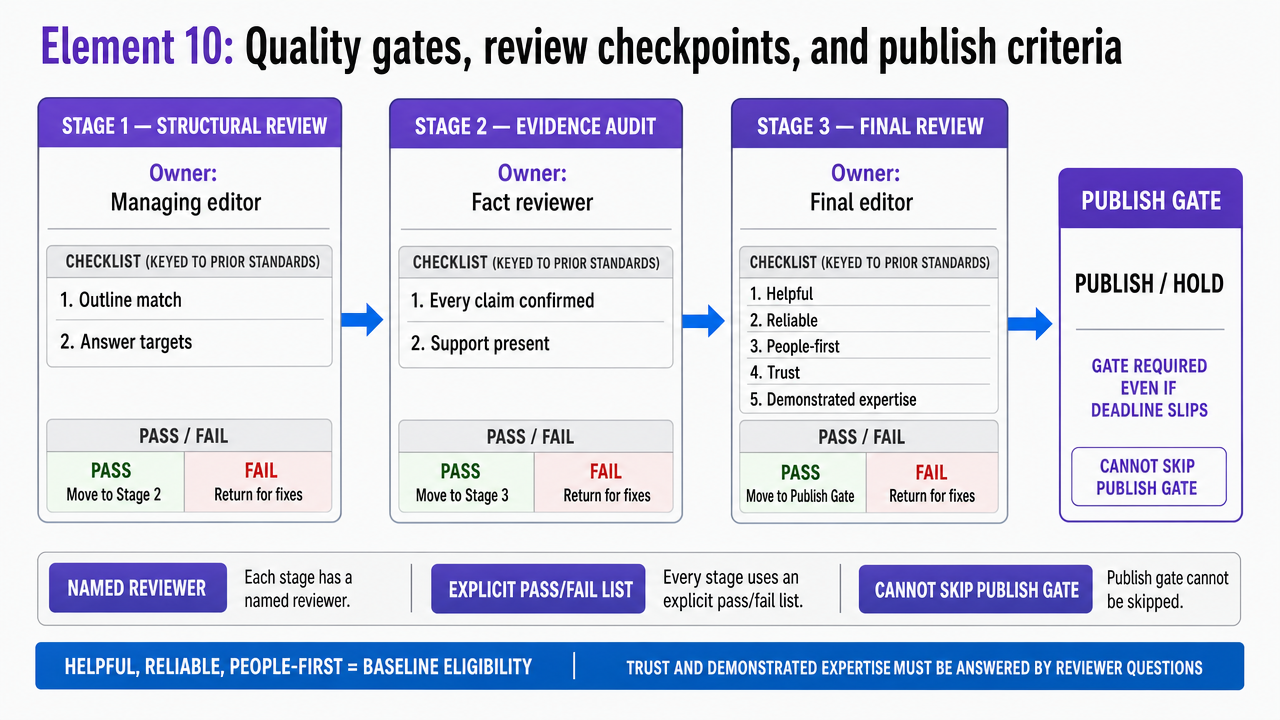
Element 10: Quality gates, review checkpoints, and publish criteria
The last field on the brief names the checkpoints a draft must clear before it ships. Not "edit for quality." A named reviewer at each stage, a checklist keyed to the standards used in every prior element, and a defined publish gate that cannot be skipped when a deadline slips.
Google's Search Essentials treats helpful, reliable, people-first content as baseline eligibility, not a bonus 4, and the helpful-content guidance frames trust and demonstrated expertise as questions a reviewer has to answer about the finished piece 1. The brief should encode those questions as an explicit pass/fail list rather than leaving them to the editor's memory.
A filled-in example for this article: Stage 1, structural review against the outline and answer targets, owned by the managing editor. Stage 2, evidence audit confirming every quantitative claim carries a citation with named scope, owned by the same editor. Stage 3, technical QA covering title and meta character counts, slug format, internal link presence, alt text on every asset, and a Rich Results Test pass on the article and FAQ schema 7. Publish gate: all three stages signed off in the ticket, no exceptions for calendar pressure.
The failure mode this prevents is the draft that slips live because the deadline mattered more than the checklist.
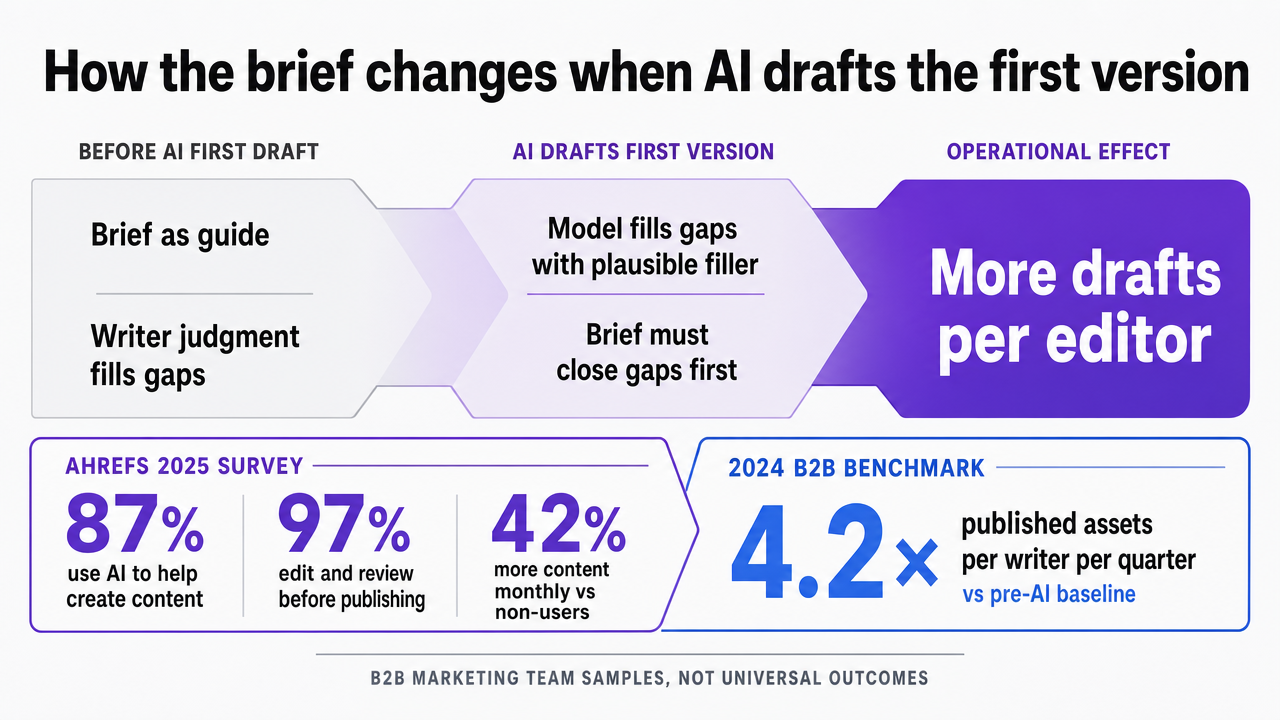
How the brief changes when AI drafts the first version
When a large language model produces the first draft, the brief stops being a guide and starts being the primary quality gate. The writer's judgment used to fill the gaps between fields; the model will fill them with plausible-sounding filler unless the brief closes them first.
The scale of the shift is documented. In Ahrefs' 2025 survey of marketers, 87% reported using AI to help create content, 97% edit and review AI content before publishing, and AI users publish 42% more content monthly than non-users 11. A separate 2024 B2B benchmark reported AI-augmented workflows producing 4.2x more published assets per writer per quarter than a pre-AI baseline 12. Both figures describe survey and benchmark samples of B2B marketing teams, not universal outcomes, but they point at the same operational reality: more drafts per editor, less time to catch problems mid-draft.
That pressure changes three brief fields in particular. The evidence field has to require citations with named scope in every paragraph containing a statistic, because models fabricate confident-sounding numbers when the source is not pinned. The voice field has to include a do-not-use list of the exact phrases the model reaches for by default. The outline field has to specify answer targets per heading, not just heading titles, because a model given a heading alone will write generic filler around it. Google's helpful-content guidance already asks whether automation was used and whether that use is evident to visitors 1; a tight brief is how the answer stays no.
Briefs-with-spec vs briefs-without: a throughput comparison
The throughput gap between a spec-grade brief and a wish-list brief shows up in revision cycles, not first-draft speed. The table below uses two industry benchmarks as directional inputs: Ahrefs' finding that AI users publish 42% more content per month than non-users 11, and the 2024 B2B benchmark reporting a 4.2x lift in published assets per writer per quarter for AI-augmented workflows 12. Both figures describe surveyed B2B marketing teams, not universal outcomes, and both assume human review remains in the loop.
The spec does not make the first draft faster. It makes the second draft unnecessary, which is where the throughput lift actually lives.
| Input | Brief without spec | Brief with spec |
|---|---|---|
| Query and intent | Topic only | Named query, one-sentence intent |
| Outline | Heading titles | Headings with answer targets |
| Evidence bar | "Cite sources" | Minimum sources, tier, scope named |
| Metadata | Written post-draft | Title, slug, meta filled in brief |
| Revision rounds (typical) | 2-3 | 0-1 |
What does not belong in the brief
A spec earns its weight by what it excludes as much as by what it demands. Three fields keep showing up in template libraries and none of them belong.
Word-count minimums are the first. Google's Starter Guide states plainly that "the length of the content alone doesn't matter for ranking purposes" 2. A 2,000-word floor tells the writer to pad. Answer targets per heading, set in Element 4, produce the length the query actually requires.
Keyword density targets are the second. Google's guidance directs writers to use "words people would use to search for the content" in prominent locations 4, not to hit a percentage. Density quotas produce awkward phrasing that reviewers then have to strip.
LSI keyword lists pulled from third-party tools are the third. They are not a Google concept, and briefs that mandate them push writers toward filler rather than the substantive coverage helpful-content guidance actually rewards 1.
Turning the 10 elements into a repeatable template
The ten fields only pay off when they live in a template every writer opens by default. A one-time document filled out for one article is a demo. A shared template with the fields prewired, the standards linked to Google and WCAG documentation 1, 2, 3, 10, and the quality gates enforced in the ticketing system is a production spec.
Content teams running four to twenty pieces a month, often with 26-50% of production outsourced 13, need the template to be self-contained. External writers should never have to ask what the intent is, which pages to link, or what schema to attach. That is the operational bar an AI-augmented workflow raises further, and it is where platforms like Vectoron encode brief-driven quality gates directly into the approval loop so nothing ships without the spec being met.
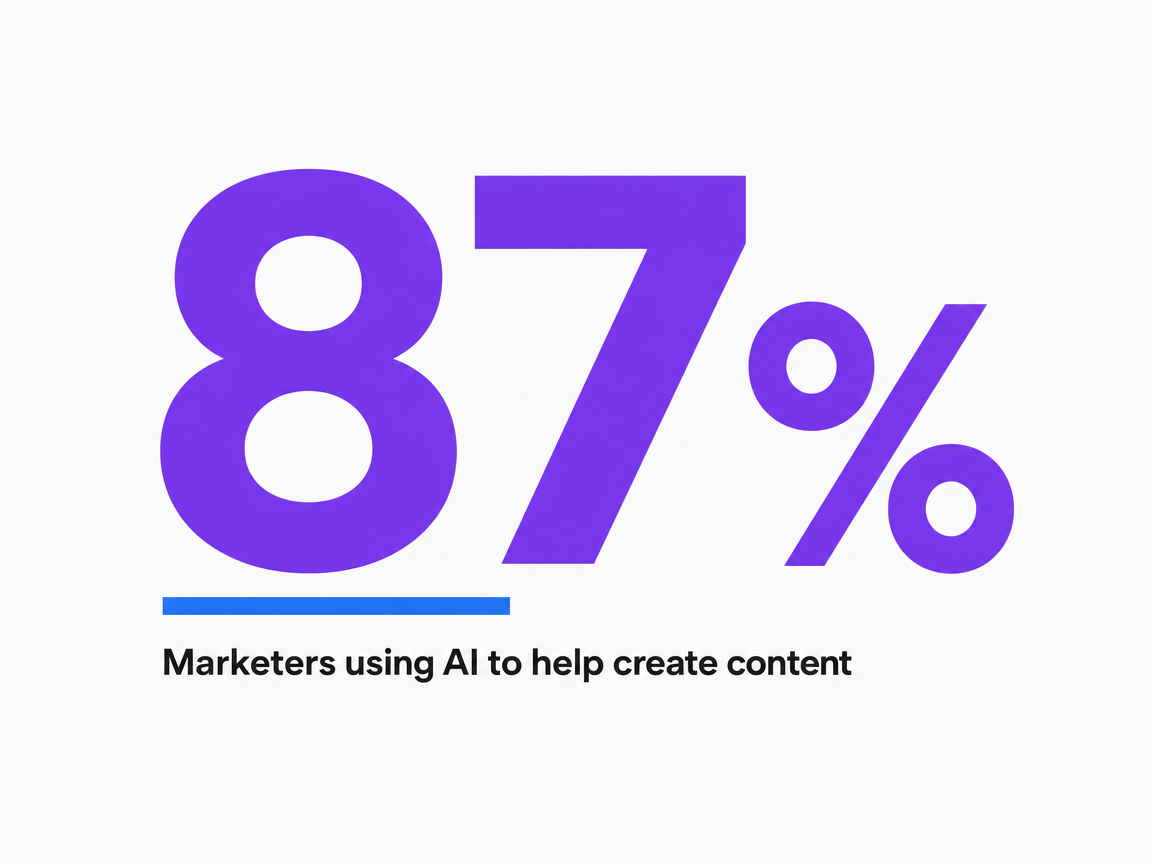 Marketers using AI to help create content
Marketers using AI to help create content
Frequently Asked Questions
References
- 1.Creating Helpful, Reliable, People-First Content.
- 2.Search Engine Optimization (SEO) Starter Guide.
- 3.SEO Guide for Web Developers.
- 4.Google Search Essentials (formerly Webmaster Guidelines).
- 5.Introduction to structured data markup in Google Search.
- 6.Structured Data Markup that Google Search Supports.
- 7.Learn About Article Schema Markup.
- 8.General Structured Data Guidelines.
- 9.Understanding Guideline 1.1: Text Alternatives.
- 10.Web Content Accessibility Guidelines (WCAG) 2.1.
- 11.Marketers Using AI Publish 42% More Content [+ New Research].
- 12.AI Content Production Benchmarks B2B 2024.
- 13.Five hard truths about successful content marketing in 2026.